5 best AI web scraper tools I'm using in 2026 (free + paid)

Nothing feels better than scraping a website, having the data come out exactly how you want it, and watching it automatically flow into a spreadsheet (or wherever you need it).
But the reality is that most AI web scraper tools are either too confusing to start using, too expensive, or just simply hallucinate and give you wrong data.
The first time I looked for an AI web scraper tool, I couldn't find anything online that was trustworthy or helpful. Most reviews were either paid promotions or written by people who clearly never actually used the tools they were recommending.
I wasted weeks testing tools that overpromised but underdelivered. And don't even get me started on the ones that charged me $200 a month just to scrape a few hundred pages.
After trying a bunch of different web scraping tools, I've narrowed it down to five AI web scrapers that actually work. These are the tools I personally use and recommend to anyone who needs to extract data from websites without losing their mind in the process.
Alright, let’s get into it.
Can ChatGPT scrape websites?
ChatGPT can fetch websites, although sometimes it's a bit finicky. It can't fully scrape a web page just yet. If you want to use the power of AI along with web scraping capabilities, you have to use a dedicated AI scraper that can integrate with ChatGPT. Bonus points if it can integrate with any LLM.
What these tools do (that we'll go over below) is use a dedicated web scraping engine to scrape data from a website, then feed that data into ChatGPT. You can prompt your LLM to do whatever you want with that data, whether it's to summarize information, extract contacts, or even send that information into another existing tool that you might be using.
Okay, now let's go over some of my favorite AI web scraping tools that you can use today.
5 best AI web scraper tools to use in 2026
Here are top AI web scrapers:
If you just want the quick version, here’s how these data scraping tools compare on price.
- Gumloop is best for AI web scraping agents. 14-day free trial, then $37 per month.
- Octoparse is best for advanced scraping at scale. Free plan, then $83 per month ($69 per month billed yearly).
- Browse AI is best for monitoring website changes. Free plan, then $19 per month billed yearly.
- Thunderbit is best for scraping marketplaces and leads. Free plan, then $15 per month.
- Firecrawl is best for developers who need an AI web crawler. Free plan, then $19 per month.
Every tool on this list has a free web scraper plan or a free trial, so you can test them before you pay for anything.
Let’s go over each of these in depth.
1. Gumloop
- Best for: AI web scraping agents
- Pricing: 14-day free trial, then starts at $37 per month
- What I like: Great for beginners, and works with 35+ AI models
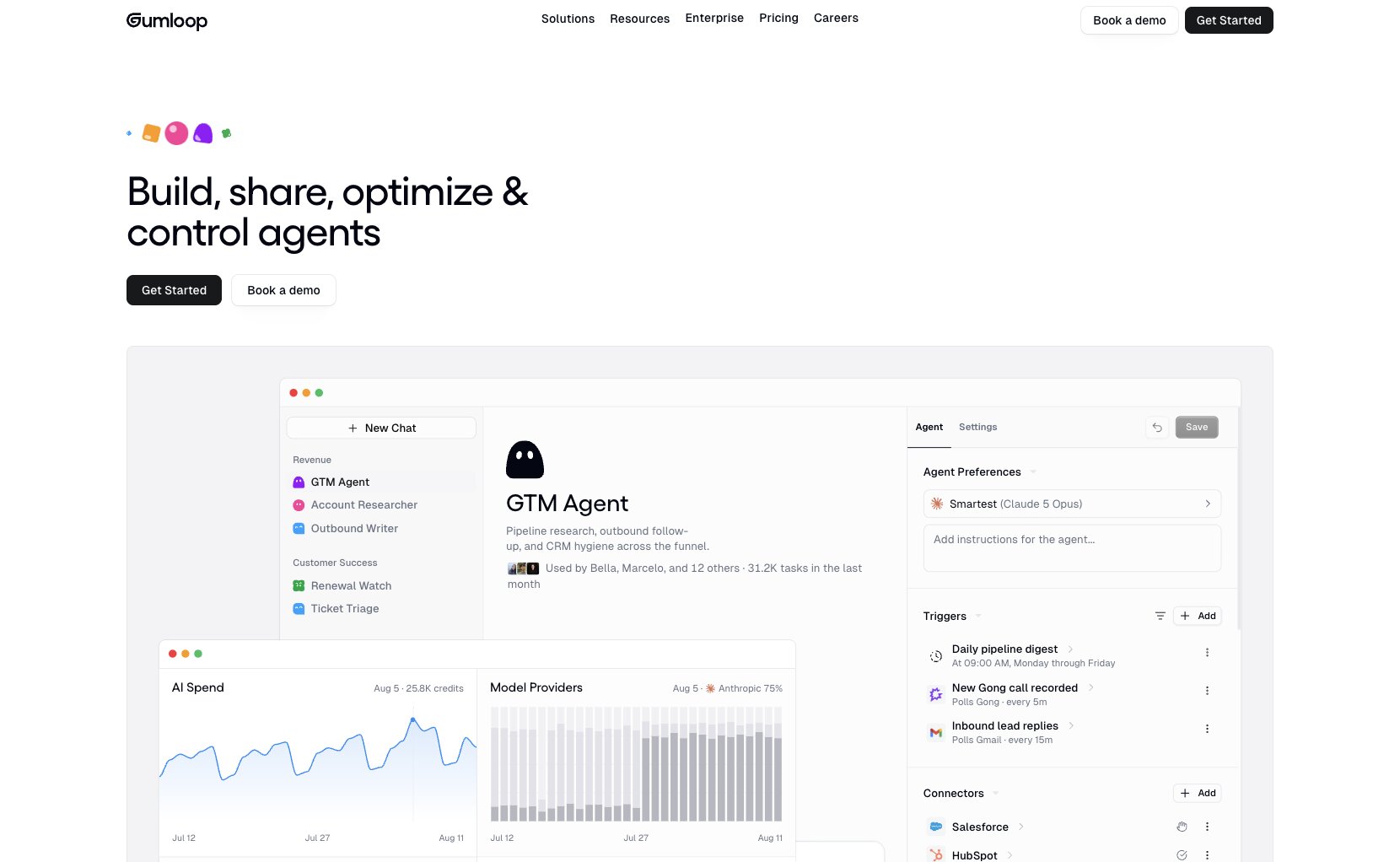
Gumloop is an AI agent platform that connects to pretty much any tool within your tech stack. You can build agents that run on any AI model like ChatGPT, Claude, and a ton more (35+ models in total), and they can take work from a simple prompt all the way to a finished result.
When it comes to web scraping specifically, Gumloop has a dedicated AI web scraping agent. You just describe the data you want, and the agent searches the web, scrapes or crawls the pages that matter, and pulls out the exact fields you asked for. It can also render JavaScript and click through load-more buttons, so data hidden behind those interactions still comes through.
For example, you can ask the agent to pull pricing from a list of competitor websites, and it hands back a clean spreadsheet with a source URL behind every row. From there, you can send that data into a Google Sheet or whatever other tool you already use.
Gumloop also comes with a 14-day free trial, so you can start scraping any website with AI before you commit to anything (you don’t even need any API keys). The Pro plan includes 20,000 credits per month, which is more than enough to get started with the platform.
Gumloop pricing
Pricing is an important part of any AI web scraping tool because most of these tools work on a credit basis. This means that the more AI credits you use, the more the pricing will increase, so it's a good idea to know what you're getting yourself into before you start.
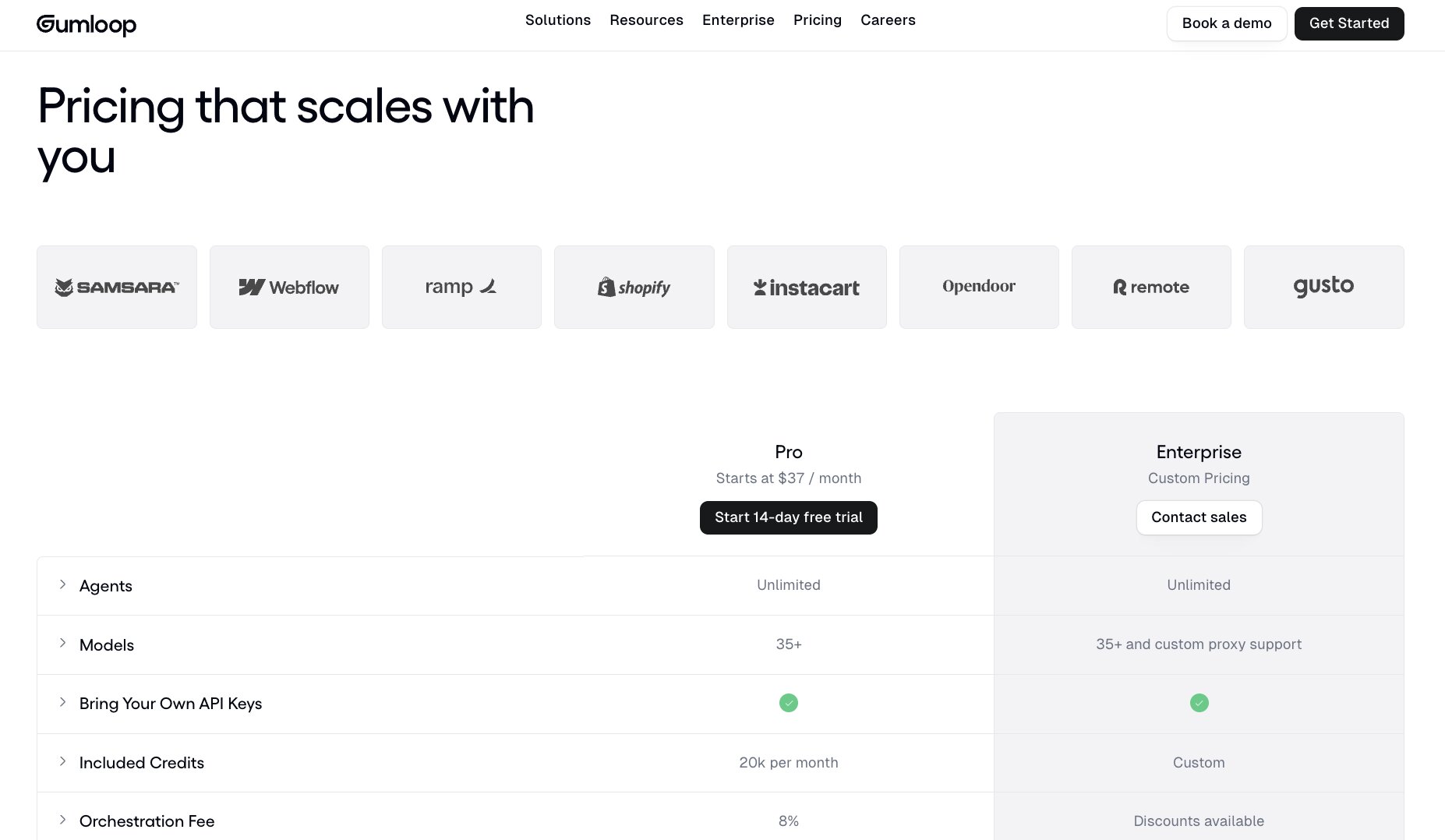
Here are Gumloop's pricing plans:
- Pro: Starts at $37 per month with 20,000 credits per month, unlimited agents, and unlimited seats (with a 14-day free trial)
- Enterprise: Custom pricing with custom credits and advanced admin and security features
You can learn more about what each plan has to offer by going to the pricing page here.
Gumloop reviews
Here are what Gumloop customers are saying about the platform:
“Gumloop wins time back across an org. It puts the tools into the hands of people who understand a task and lets them completely automate it away.” — Bryant Chou, Co-founder @ Webflow
“Gumloop has been critical in helping all teams at Instacart - including those without technical skills - adopt AI and automate their workflows, which has greatly improved our operational efficiency.” — Fidji Simo, CEO @ Instacart
Overall, Gumloop is a great tool to start your AI web scraping journey. And it's a tool that I've been using for almost a year now.
2. Octoparse

- Best for: Advanced web scraping at scale
- Pricing: Free plan, then starts at $83 per month
- What I like: Has lots of web scraping templates
Octoparse is one of the first web scraping tools that I've used. It's another no-code solution for being able to scrape any website and turn it into structured data. Unlike Gumloop that can do any AI automated workflow, Octoparse is specifically designed for just web scraping.
You can create web scraping workflows that interact with web elements and can bypass certain web scraping challenges. Note that I will never advocate for anybody to illegally scrape any website. However, Octoparse does give you tools like IP rotation, captcha solving, proxies, and a bunch more features that you'll probably run into if you're scraping websites at a massive scale.

The platform also has templates for different use cases so you can make data extraction pretty easy. It has tools like a Twitter scraper, a Google Maps scraper, Google search scraper, and even a TikTok scraper. There are tons of sites that you can scrape with their pre-built templates.
It is a bit of an advanced tool and it's generally recommended you have some technical knowledge, but there are tons of guides on their site. You can do a lot of advanced things like web scraping using Python and collecting data in different ways.
Octoparse pricing
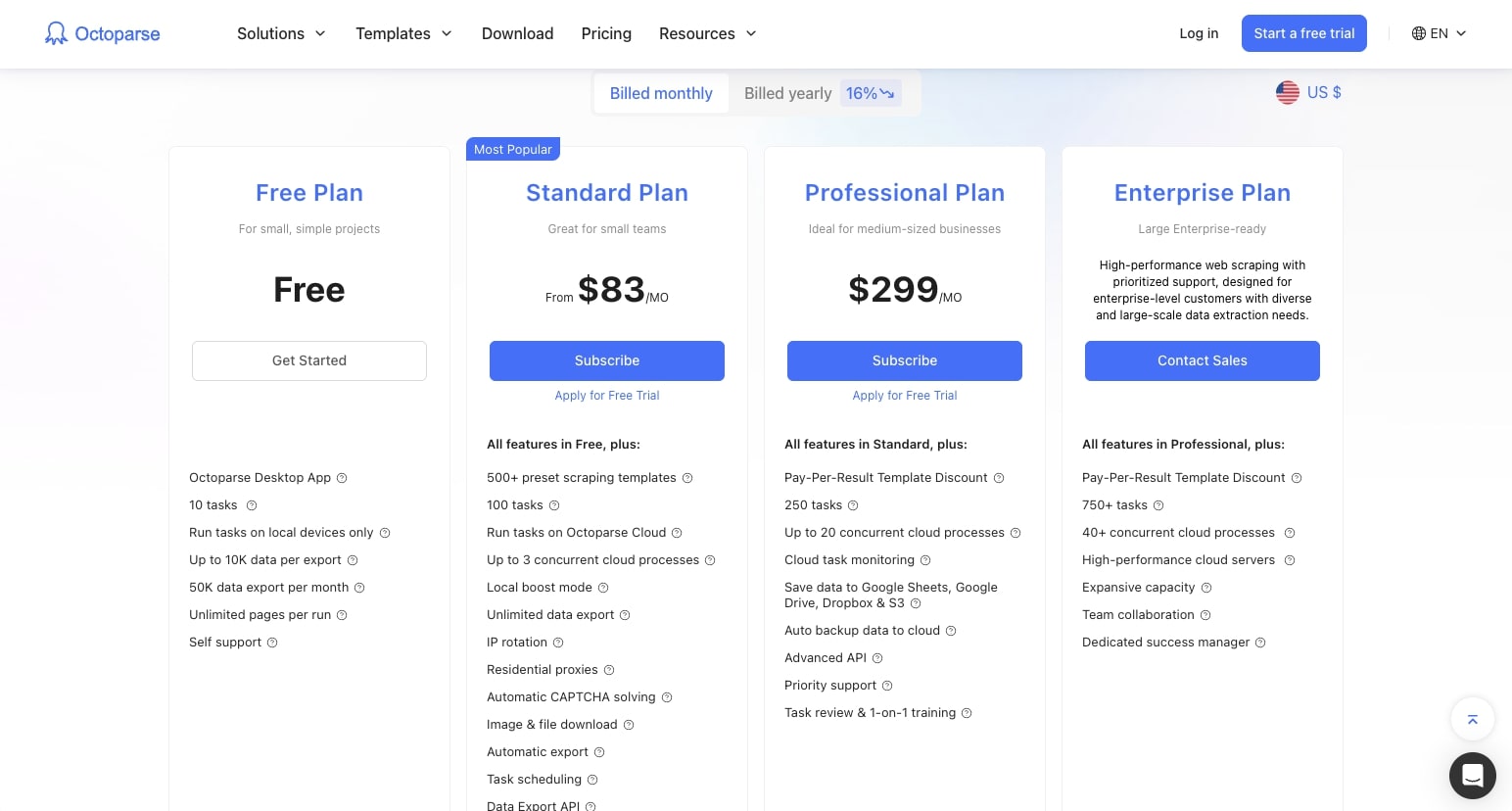
When it comes to pricing, Octoparse has a few options. Here are all their pricing plans:
- Free plan: $0 per month and allows you to use the desktop app and run 10 tasks
- Standard plan: Starts at $83 per month ($69 per month billed yearly) and lets you run 100 tasks and comes with 500+ preset scraping templates
- Professional plan: Starts at $299 per month ($249 per month billed yearly), gives you 250 tasks along with advanced API support
- Enterprise plan: Custom amount of tasks and features, so you'll have to reach out for pricing
As you can see, it’s not the most affordable platform on the market, but it does have a lot of features that can make it worth it.
Octoparse reviews
Here’s what customers of Octoparse rate the platform on third-party review sites:
- G2: 4.8 out of 5 star rating (from +52 user reviews)
- Capterra: 4.7 out of 5 star rating (from +106 user reviews)
3. Browse AI
- Best for: Monitoring competitor websites and data changes
- Pricing: Has a free plan, then starts at $19 per month (billed annually)
- What I like: Good for monitoring competitor website changes
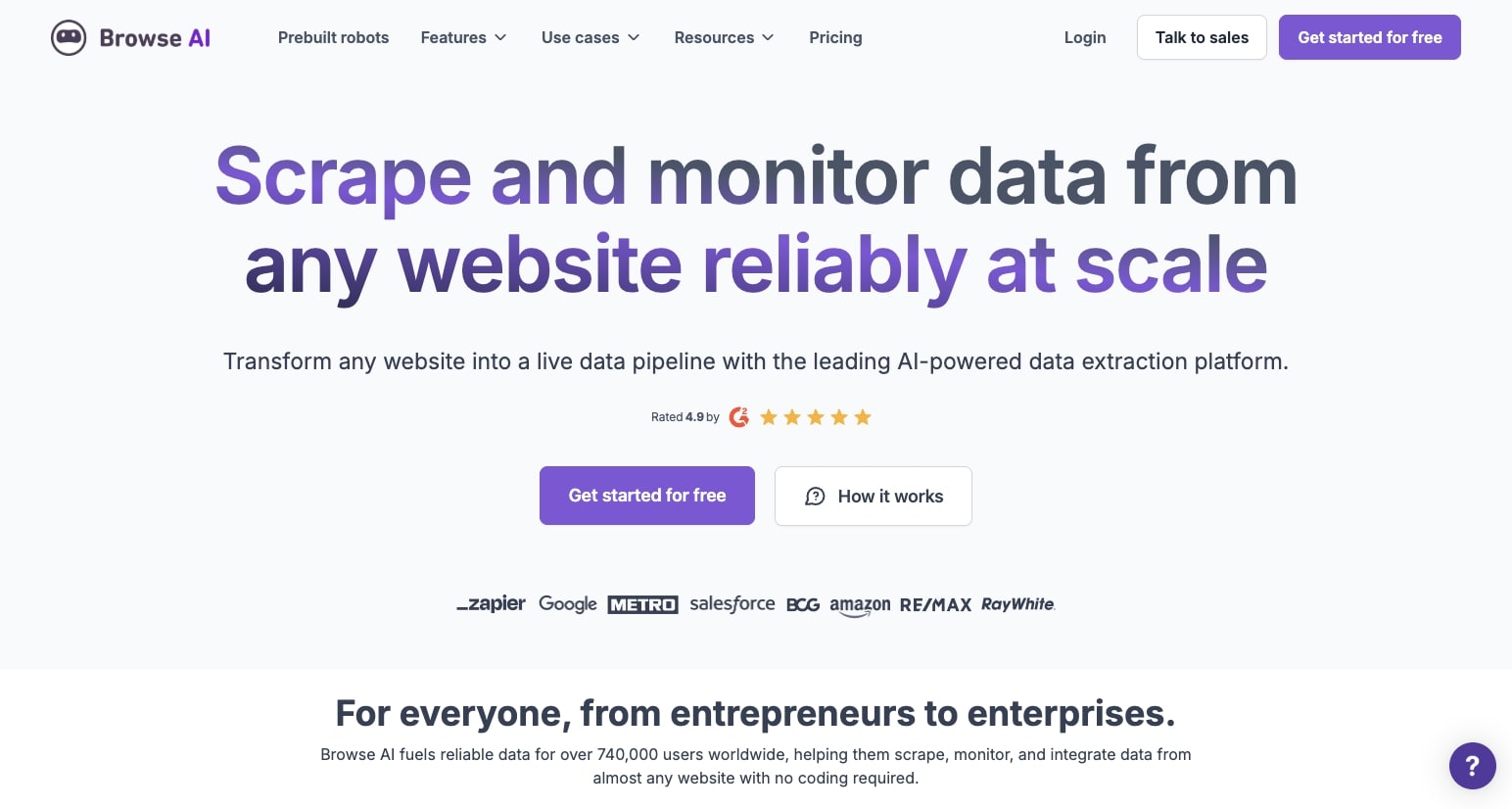
Browse AI is a web scraping tool that allows you to scrape and specifically monitor data from any website. Similar to Gumloop and Octoparse, you can scrape websites or social media platforms and extract data. However, what makes Browse AI interesting is that they market themselves as a monitoring platform.
So with Browse AI, you can study your competitors' websites and monitor any changes that occur to them. For example, I actually have this happen with my personal blog website, where people use tools like Browse AI to get notifications anytime I publish a new blog post (and then they reach out to me about it, which is pretty wild). So I know people use these tools for that specific use case.
But you can use it for any use case to extract data from a website and structure that data at scale. Whether it's to scrape directories of local businesses, job postings, real estate listings, or whatever, Browse AI is a solid platform to look into, especially if you are trying to collect data from local businesses.
They also have a Chrome extension that makes it easy to do this as you’re “browsing” (no pun intended) a website in real-time.
Browse AI pricing
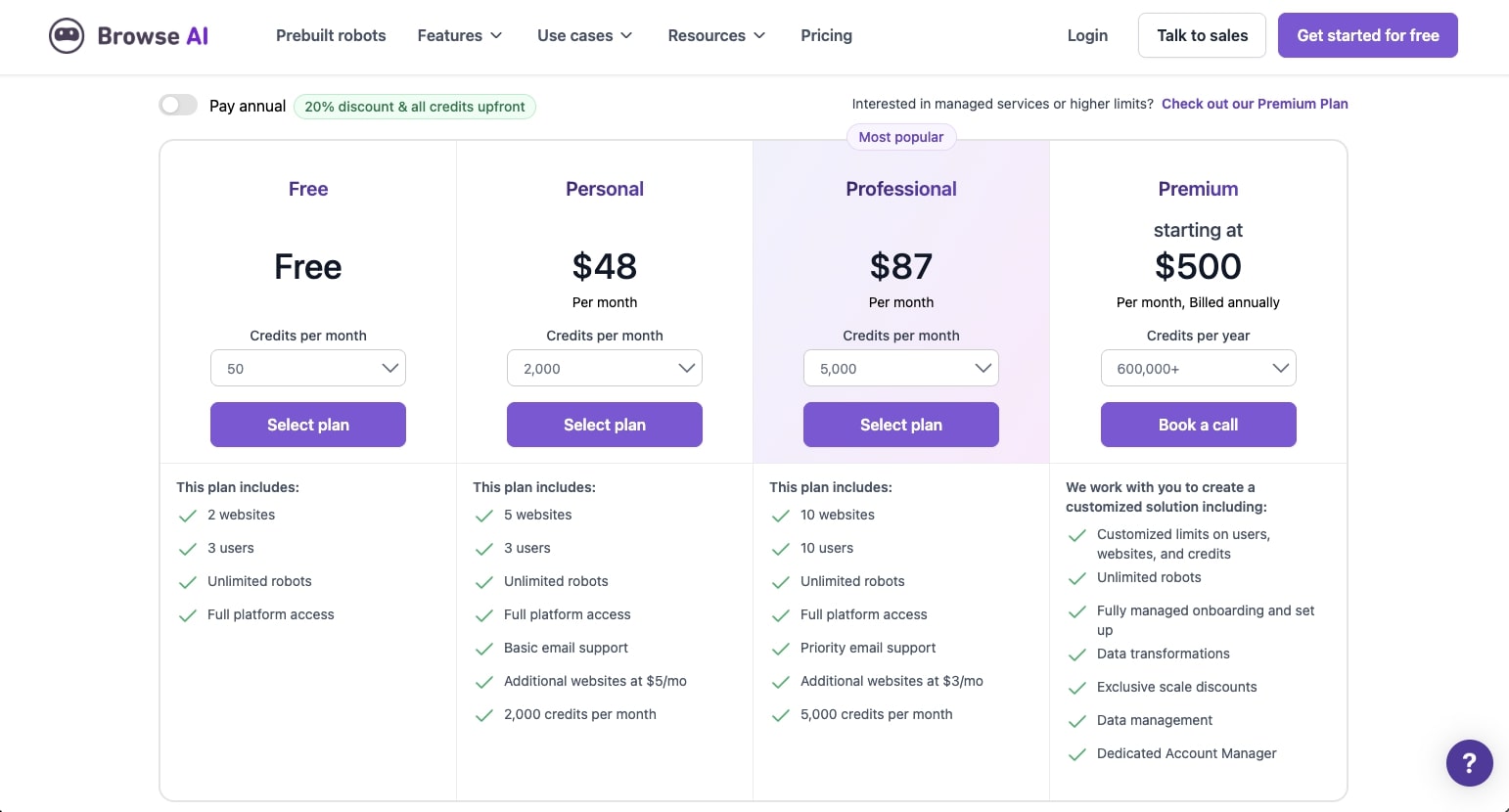
When it comes to pricing, Browse AI has several options. Here are all their pricing plans:
- Free plan: $0 per month with 50 credits per month and 2 domains
- Personal plan: Starts at $19 per month (billed annually) with 12,000 credits per year and 5 domains
- Professional plan: Starts at $69 per month (billed annually) with 60,000 credits per year and 10 domains
- Premium plan: Starting at $500 per month (billed annually) with 600,000+ credits per year and fully managed setup
If it’s not quite the right fit, I also put together a list of Browse AI alternatives worth checking out.
Browse AI reviews
Here's what customers of Browse AI rate the platform on third-party review sites:
- G2: 4.8 out of 5 star rating (from +51 user reviews)
- Capterra: 4.5 out of 5 star rating (from +59 user reviews)
4. Thunderbit

- Best for: Scraping marketplace websites
- Pricing: Free plan, then starts at $15 per month
- What I like: Claims to scrape data in 2 clicks
Thunderbit is a next-gen AI web scraper that claims to scrape data in just two clicks. This platform is specifically good if you're trying to scrape social media platforms, especially LinkedIn, and it's mostly designed for sales or ops teams.
For example, you can use it to extract information from candidates on LinkedIn or prospecting customers, and then you can feed the data from Thunderbit to an email outreach platform. You can use AI to organize the website content and create tables for you. Thunderbit also supports PDFs, images, and even document scraping.
Just like Browse AI, it's also really good if you are trying to scrape data from marketplace websites. Think Zillow, Google Maps, eBay, or even Amazon. You can use Thunderbit to extract data from multiple product listings and put them into a spreadsheet. From there, you can take that web data and export it to Google Sheets, Airtable, or even Notion.
Overall, it's a great platform if you work in sales, you're a realtor, or you work in operations.
Thunderbit pricing
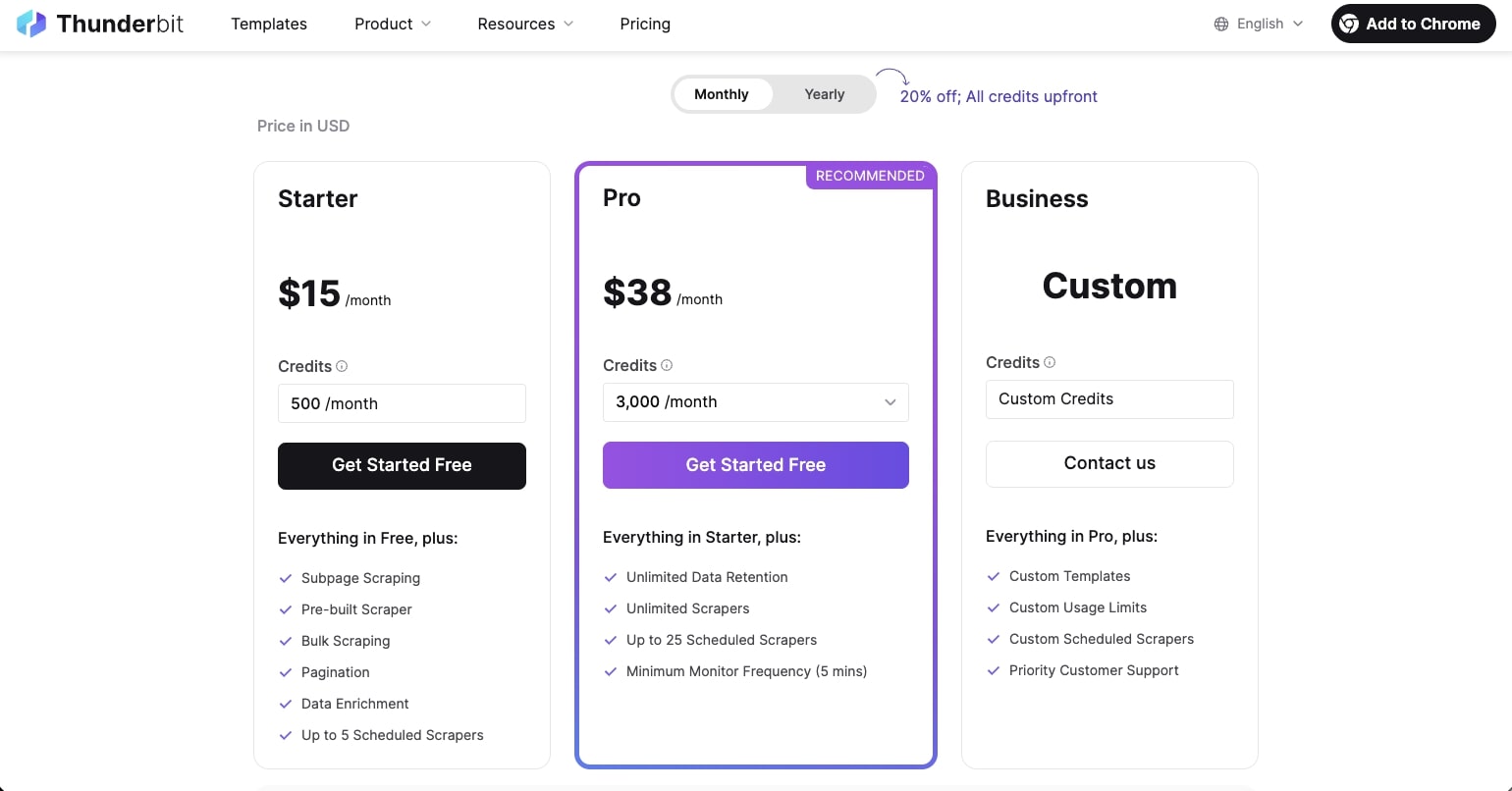
Here are Thunderbit's pricing plans:
- Free plan: $0 per month with 6 pages/month (maximum of 30 credits per page)
- Starter plan: $15 per month with 500 credits and up to 5 scheduled scrapers
- Pro plan: $38 per month with 3,000 credits and up to 25 scheduled scrapers
- Business plan: Custom pricing with custom credits and priority customer support
You can learn more about what each plan offers by going to their pricing page here.
Thunderbit reviews
Here's what customers of Thunderbit rate the platform on third-party review sites:
- Trustpilot: 3.4 out of 5 star rating (from +4 user reviews)
- Product Hunt: 4.7 out of 5 star rating (from +12 user reviews)
5. Firecrawl
- Best for: Developers building web scraping features
- Pricing: Free, then starts at $19 per month
- What I like: Open source platform to build on
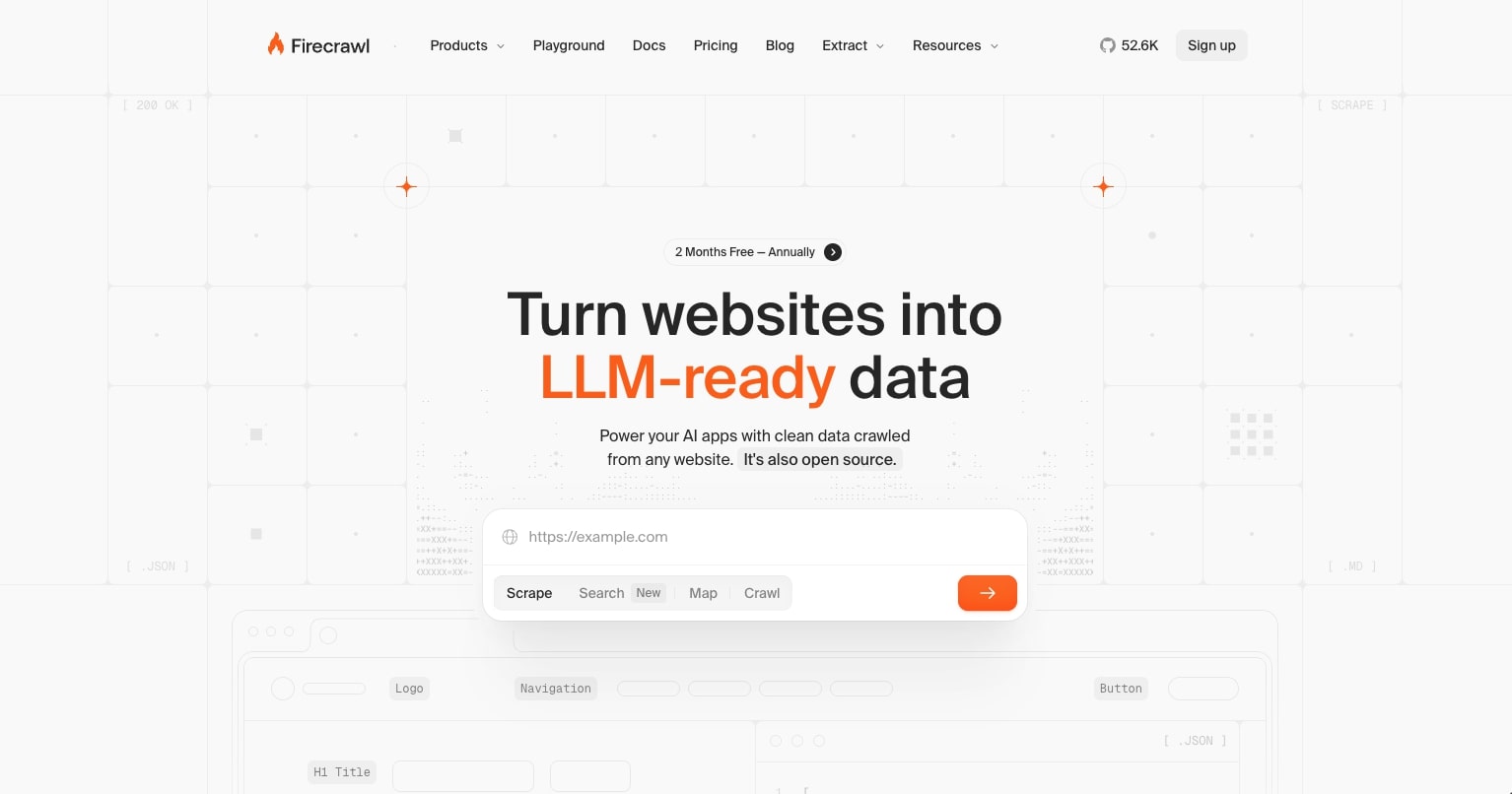
Firecrawl is a really cool web scraping tool that has been growing fast. It's more developer-heavy and technical compared to the rest of the tools I went over on this list, but it's a powerful open source platform.
With Firecrawl, you can essentially input any URL and it will turn websites into LLM-ready data. While it's not a no-code platform that can make you scrape data into pretty formats, it's the AI web scraping layer that can be used to develop other internal tooling with.
You can scrape data and turn it into markdown, JSON, screenshots, or whatever you need. On top of that, you can also search the web and get full content from the results, as well as crawl all the pages on a website and get data for each individual page. So if you’re specifically looking for an AI web crawler rather than a one-page scraper, Firecrawl is the one on this list I’d look at first.
It's an extremely powerful development tool and there's no reason why it's been growing really fast. I highly recommend you go to their website and input your URL and test it out for yourself. However, if you do need more of a user-friendly platform, then you probably want to use a different tool that's on this list.
Firecrawl pricing
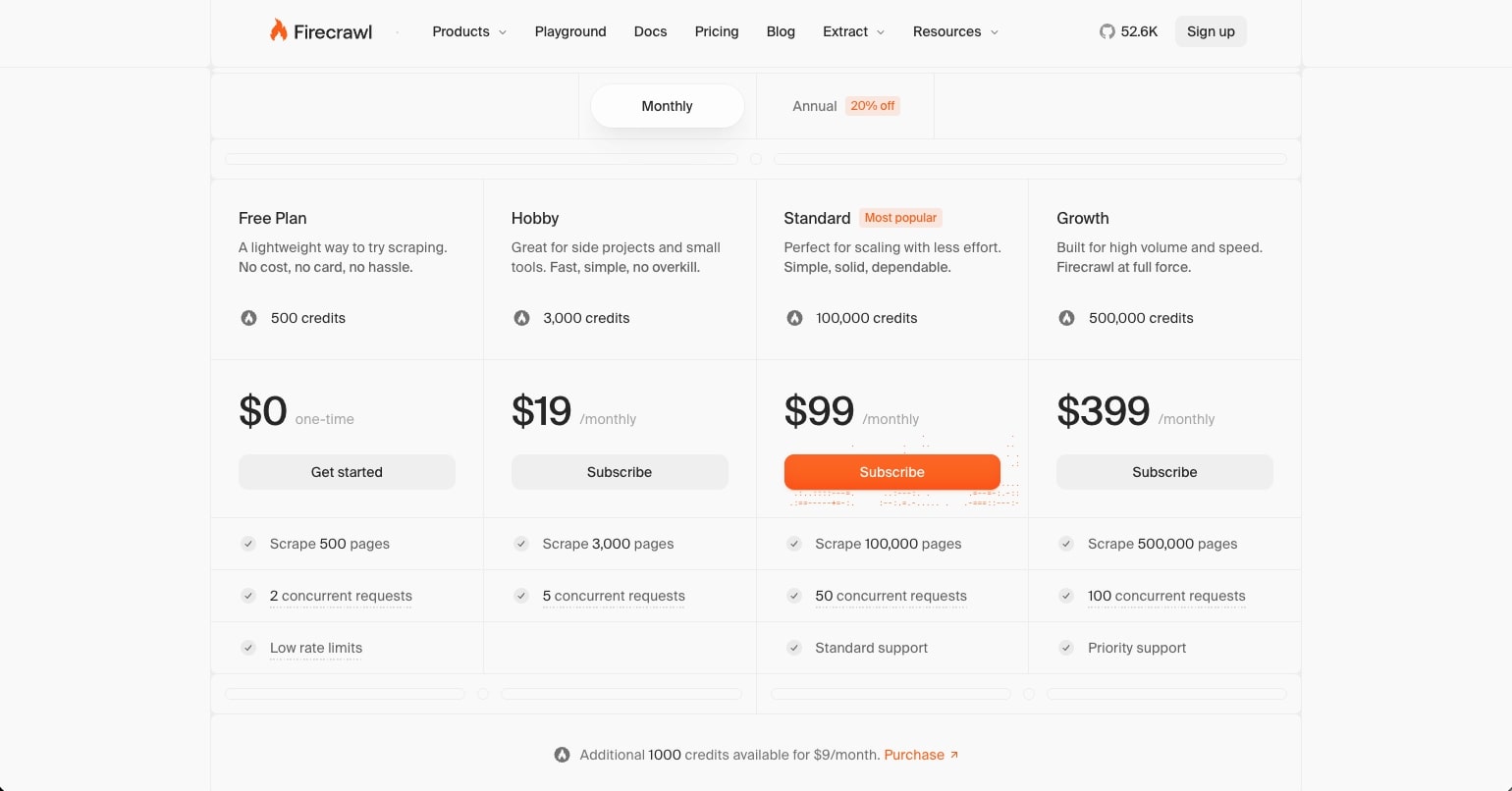
When it comes to pricing, Firecrawl has a lot of options. Here are all their pricing plans:
- Free plan: $0 per month with 1,000 credits every month to scrape 1,000 pages
- Hobby plan: $19 per month with 5,000 credits to scrape 5,000 pages
- Standard plan: $99 per month with 100,000 credits to scrape 100,000 pages
- Growth plan: $399 per month with 500,000 credits to scrape 500,000 pages
- Scale plan: $599 per month (billed yearly) with 1,000,000 credits, plus custom plans if you need more
Firecrawl reviews
There currently aren’t any reviews of Firecrawl on user review sites, but you can check out this written review by Michelle to learn more about the platform.
Web scraper vs. web crawler, which one do you need?
You’ll see these terms used interchangeably, but they do slightly different jobs. A web scraper pulls specific data from a page, like prices, names, or contact info. A web crawler moves through a website by following links and collecting every page it finds. Most data crawling tools today do both, crawling to find the right pages and then scraping the fields you actually care about.
If you only need data from a handful of pages, any of the web scraping tools on this list will work. If you need to map or crawl an entire site, Firecrawl and Gumloop’s web scraping agent are the best website crawler options here, since both can crawl a whole section of a site and pull data from every page. Thunderbit also handles subpage scraping and pagination if you’d rather stay inside a Chrome extension.
What is the best AI model for web scraping?
There currently is no best model for web scraping, however there are some models that are better than others. For example, if you're using OpenAI models, the best model right now would ideally be GPT-6 Astra. It's great at handling messy real-world HTML and text. It's also great at extracting structured data like JSON or CSV outputs. And it’s the strongest when it comes to reasoning, so it's really good for dynamic or complex websites.
If you're using Anthropic's Claude, then the best model there would be Claude Opus 5.5, which is Anthropic’s latest Opus model and it can handle most complex reasoning tasks.
However, these models aren't just good on their own. What you have to do is pair them up with a tool that can actually scrape website data and then you feed that data into one of these AI models to give you whatever desired output you're looking for.
This is why using a tool like Gumloop is great because its web scraping agent works with any LLM, and then it can connect that to any other tool that you may need like a Google Sheet, Airtable, a Notion table, or even just a simple Google Doc.
With this route you're essentially creating AI agents and robots that can go out and do different data collection tasks.
As AI models continue to improve throughout 2026, we'll likely see even better web scraping functionality. For now, pairing any solid LLM with a dedicated scraping tool is your best bet.
Happy web scraping!

Read related articles
Check out more articles on the Gumloop blog.
.webp)
.webp)