

7 best LangChain alternatives for AI agents in 2026 (free + paid)

When I first started looking into building AI agents for my marketing agency, LangChain kept coming up.
It sounded powerful but also really technical. And after digging into it, I realized it kind of is. LangChain is a developer framework built for engineers who want full programmatic control over chains, agents, RAG pipelines, and model orchestration.
If you're comfortable writing Python or TypeScript and managing your own infrastructure, it's a great tool.
But if you're not a developer (vibe coders included), or you just want to get an AI agent up and running without spending weeks learning a framework, LangChain can feel like overkill.
That's what led me to start testing LangChain alternatives. I wanted to find tools that could do a lot of what LangChain does, whether that's building agents, connecting language models to my tools, or automating multi-step workflows, but without needing an engineering background to get started.
I've been testing AI agent platforms and automation tools for over two years now. And I've put together a list of the ones I think are the best alternatives to LangChain depending on your use case, your technical ability, and what you're actually trying to build.
But before we jump into the list, let me go over what I looked for when evaluating each tool.
What I looked for when choosing a LangChain alternative
Before I started comparing tools, I wanted to be clear on what actually matters when picking a platform for AI agents and workflows.
LangChain is powerful, but it's a developer framework. Not everyone needs that level of control, and not every team has the engineering resources to build on it. So I looked at each tool through a few different lenses depending on who's using it and what they're trying to build.
Here are the things I kept in mind when putting this list together:
- Visual builder vs code-based framework: LangChain is a code-first framework. Some alternatives give you a full no-code visual builder, others are purely code-based, and a few offer both. It depends on your team's technical ability and how much control you need over the process.
- Language model flexibility: Does the platform lock you into one model, or can you use language models from OpenAI, Anthropic, Google, or open-source providers? I wanted tools that let you swap models without having to rebuild your AI workflows from scratch.
- RAG and knowledge handling: LangChain has strong support for RAG pipelines, so any alternative worth considering should have a solid way to connect your own data sources, documents, and knowledge bases to your agents.
- Agent orchestration: Can the platform handle multiple agents working together? I looked for tools that support multi-agent workflows, tool calling, memory, and multi-step reasoning. Not just simple if-this-then-that automations.
- Ease of use and learning curve: How fast can you go from signing up to actually building something useful? Some frameworks take a long time to figure out. Others let you describe what you want in plain language and start building in minutes.
- Integrations: It's not just about the number of integrations, but how deep they go. Can you integrate with MCP servers? Does it support webhooks? Can you connect to your existing tools and pull data without a bunch of workarounds?
- Data processing and document handling: A lot of real-world AI workflows involve processing documents, emails, spreadsheets, and unstructured data. I looked for platforms that handle that well without requiring you to write custom parsing logic.
- Self-hosted vs cloud-only: LangChain can run anywhere you deploy Python. If self-hosting is a requirement for your team, you want to make sure the alternative supports it too, or at least has strong privacy and compliance standards.
- Scalability and enterprise readiness: Can the platform handle real production workloads? I looked for things like role-based access control, audit logs, SSO, and deployment flexibility. These matter a lot once you move past prototyping.
- Pricing and cost efficiency: Some platforms get expensive fast once you start running a lot of tasks or processes. I wanted to include options across different budgets so there's something for everyone.
Not every tool on this list checks every box. But these are the core requirements I kept in mind when evaluating each one. I'll go over the pros and cons of each tool and who they're best for depending on your use case.
Alright, let's get into it.
7 best LangChain alternatives and competitors in 2026
Here are the top LangChain alternatives:
- Gumloop (best for building AI agents without code)
- CrewAI (best for multi-agent orchestration in Python)
- StackAI (best for enterprise teams in regulated industries)
- Make (best for non-technical teams on a budget)
- Zapier (best for connecting AI to your existing SaaS stack)
- Dify AI (best for open-source visual agent and RAG building)
- Gemini Enterprise Agent Platform (best for teams already in the Google Cloud ecosystem)
If you just want the short version, here is how these alternatives to LangChain compare on who they are best for and what they cost to start.
- Gumloop: Best for AI agents anyone on your team can build without code. 14-day free trial, then starts at $37/month.
- CrewAI: Best for multi-agent orchestration in Python. Free open-source framework and a free cloud plan with 50 executions/month, then custom Enterprise pricing.
- StackAI: Best for regulated enterprises. Free plan with 500 runs/month, then custom Enterprise pricing.
- Make: Best for visual automation on a budget. Free plan with 1,000 credits/month, then starts at $10.59/month.
- Zapier: Best for the biggest app library. Free plan with 100 tasks/month, then starts at $29.99/month.
- Dify AI: Best for open-source visual agent and RAG building. Free to self-host, cloud plans start at $59/month.
- Gemini Enterprise Agent Platform: Best for Google Cloud teams. Pay as you go, with $300 in free credits for new Google Cloud customers.
Quick note on this update. Flowise shut down in August 2026, so I replaced it with Dify. And Vertex AI's agent tools now live under a new name, Gemini Enterprise Agent Platform. I also rechecked pricing for every tool on the list.
Lets go over each one.
1. Gumloop
- Best for: Teams that want anyone, not just engineers, to build and run AI agents across their tools
- Pricing: 14-day free trial, then Pro starts at $37/month with 20k credits included. Enterprise pricing is custom
- What I like: 35+ AI models are included through credits, so you don't need separate API keys, and you can build an agent just by describing the job in plain English
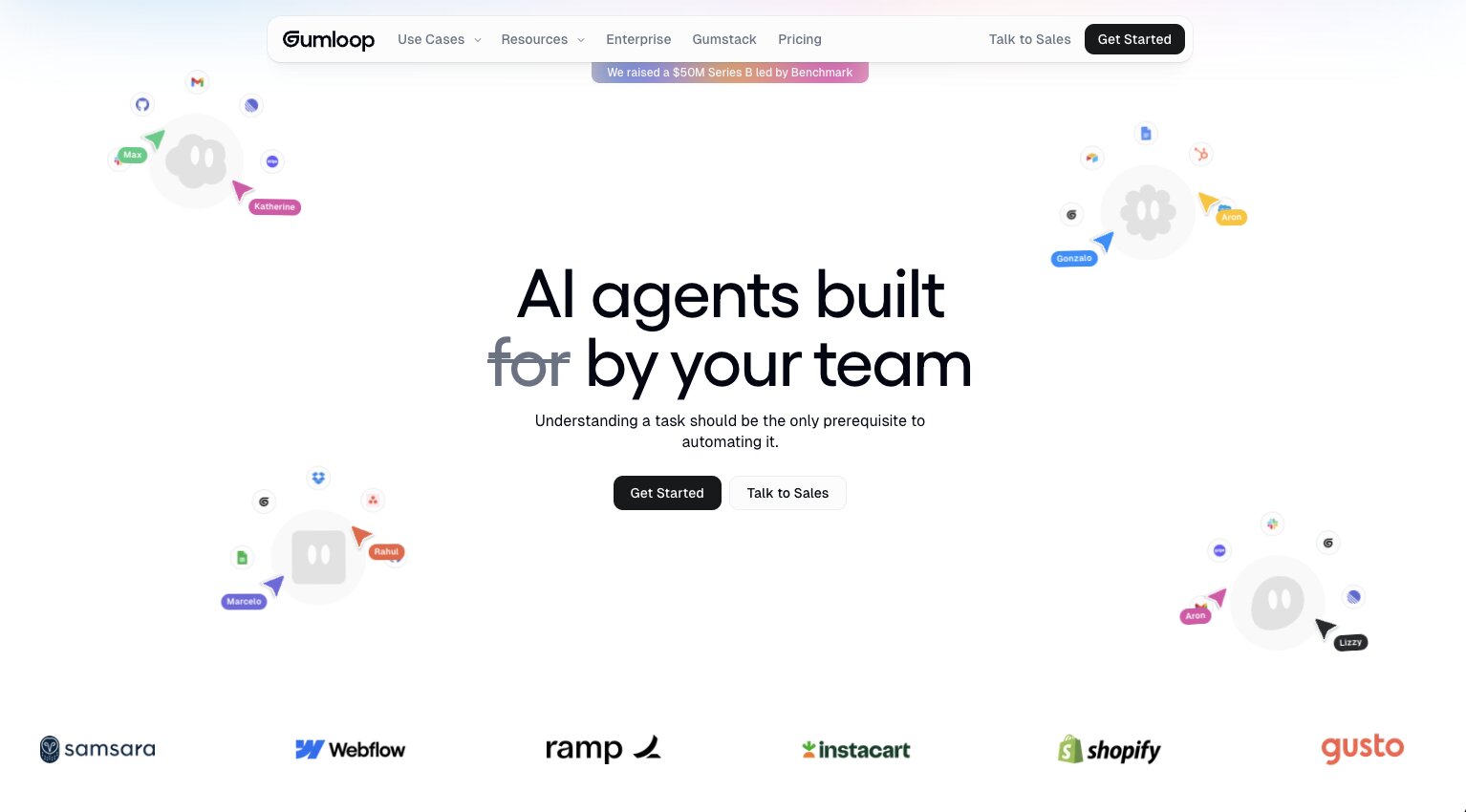
Gumloop is a platform for building and deploying AI agents, and the idea is that anyone on your team can roll out specialized agents in minutes without touching code.
I've been using Gumloop for over a year now, and it's used by companies like Gusto, Instacart, Samsara, Shopify, and Webflow. But it's also user-friendly enough for someone like me who runs a media company solo. It really covers the full spectrum, which is rare in this space.
Gumloop recently raised a $50M Series B led by Benchmark, and Gusto's CIO described building with Gumloop as giving them "a whole new pool of engineering capacity." So it's clearly getting traction at the enterprise level.
How Gumloop works
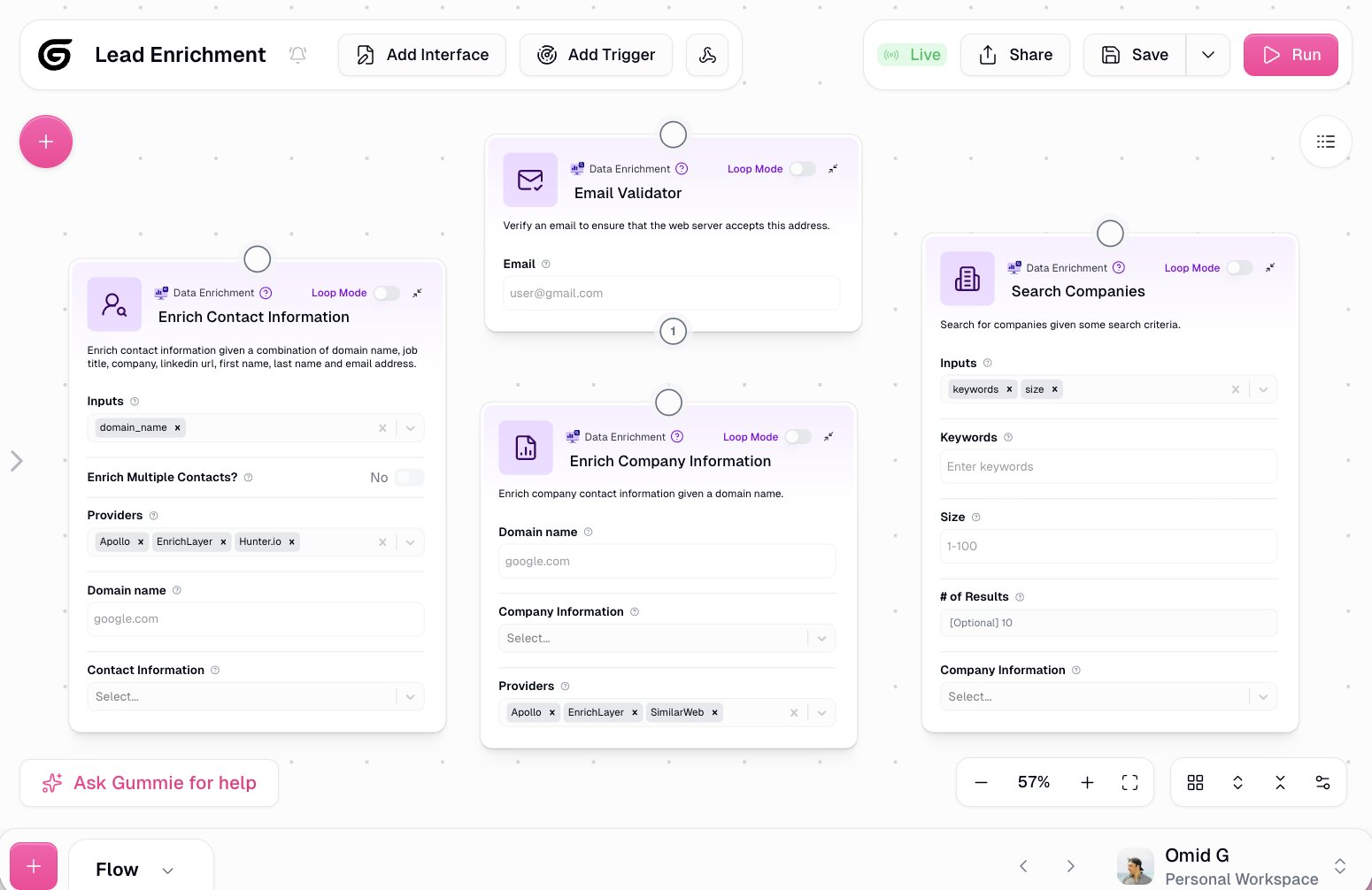
Gumloop is agent-first now. You create an agent, give it instructions in plain English, pick a model, and connect the apps it needs from 400+ connectors. Then you chat with it, or let it run in the background on app triggers and recurring schedules.
If you're coming from LangChain, think of it as the agent loop, tools, and memory already wired up for you. Agents can use skills, build files and reports, and even open a real browser to work on sites that don't have an API. Gumloop still supports its original visual workflows (now marked legacy) for step-by-step flows, but most new builds start as an agent.
When it comes to models, you pick from 35+ options per agent, including the latest from Anthropic, OpenAI, and Google. Usage comes out of your included credits, so no separate API keys are required. You can bring your own keys if you prefer, but you don't have to.
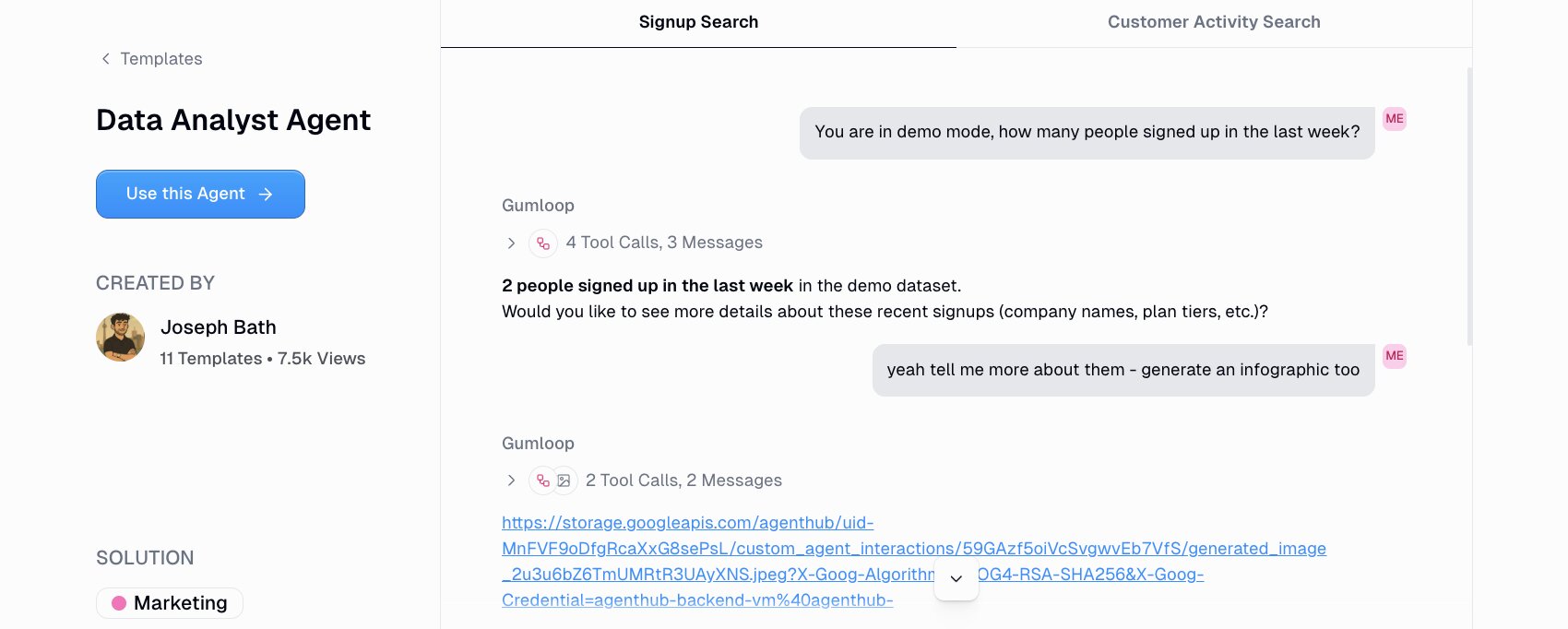
The types of agents you can build cover a pretty wide range. One I find really useful is a data analyst agent connected to Slack, where your team can ask questions like "which customers are likely to churn" or "where are people dropping off in the onboarding flow" and get answers in real time.
Gumloop also handles marketing and content agents, ops agents, meeting prep, call analysis, support triage, and CRM management. You can set up recurring triggers to keep agents running in the background on a schedule, or fire them based on events like form submissions.
Gumloop also recently launched Gumstack, which is a security and observability layer for the agentic era. It monitors, audits, and analyzes all AI activity across your organization, not just inside Gumloop. It gives you centralized access controls, tool call traceability, MCP inventory and auditing, SSO and SCIM integration, and per-tool authorization policies. It's built to help IT teams go from shadow AI to full visibility.
Why choose Gumloop over LangChain
Here are some reasons why I'd pick Gumloop over LangChain:
- Gumloop lets anyone on your team build and deploy AI agents without writing code. LangChain requires Python or TypeScript skills and infrastructure knowledge. Gumloop removes that barrier entirely.
- 35+ models are available through included credits. You don't have to manage separate API keys, billing accounts, or provider configurations. LangChain requires you to set up and pay for each model provider yourself.
- You can describe the agent you want in plain English and refine it in chat. With LangChain, you write, test, and host all of that logic yourself.
- Agents can live directly inside Slack and Teams, so your whole team can interact with them like coworkers. LangChain requires you to build that integration layer yourself.
- Gumloop is SOC 2 Type II certified and GDPR compliant, with Zero Data Retention agreements with third-party model providers. It also ships with enterprise features like RBAC, audit logs, VPC deployments, and AI model access controls. Getting to that level with LangChain requires significant custom security work.
Gumloop pros and cons
Here are some of the pros I've found with Gumloop:
- You can build an AI agent by describing it in plain English, and still use visual workflows when you want step-by-step control.
- 35+ models from Anthropic, OpenAI, Google, and more come through included credits. No API key management needed.
- Every agent can get a real browser, so it can work on websites that don't have an API.
- Agents connect directly to Slack and Teams so your team can interact with them in the tools they already use every day.
- Used by enterprise companies like Gusto, Instacart, Shopify, Samsara, and Webflow, but still accessible enough for solo operators and small teams.
- Enterprise secure with SOC 2 Type II, GDPR compliance, RBAC, audit logging, VPC deployments, and Zero Data Retention agreements with model providers.
- Gumstack adds a centralized security and observability layer that tracks AI activity across your entire organization, not just Gumloop.
Here are some of the cons I've found with Gumloop:
- There's no free plan anymore. You get a 14-day free trial, and then Pro starts at $37/month.
- You get the most out of it when you have a clear use case you want to automate. Going in without a specific job in mind can make the initial experience feel open-ended.
- The library covers 400+ connectors, but some niche tools still need a custom MCP server to fill the gap.
And just to be clear, I know it sounds biased that I'm recommending this tool on the Gumloop blog. But I'm not an employee at Gumloop. I'm a customer and I asked if I could write this so I can share my own experience.
Gumloop pricing
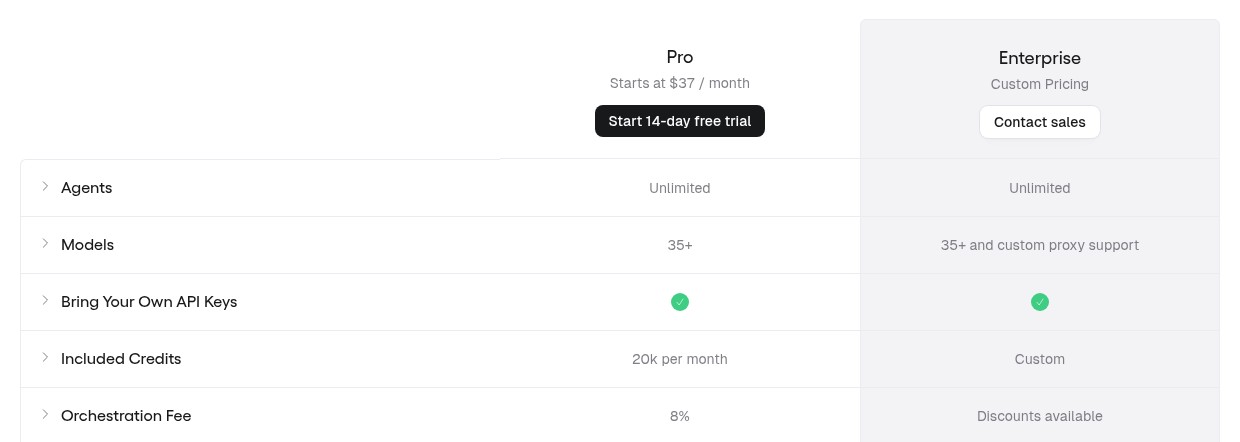
Here are Gumloop's pricing plans:
- Pro: Starts at $37/month with a 14-day free trial, 20k credits per month, unlimited agents, seats, and teams, 35+ models, bring your own API keys, 5 concurrent workflow runs, 25 concurrent agent chats, and one hosted MCP server. An 8% orchestration fee applies to usage
- Enterprise: Custom pricing with custom credits, custom model proxy support, org-wide connector policies and guardrails, role-based access control, SCIM/SAML support, admin dashboard, audit logs, custom data retention rules, data exports, incognito mode, AI model access control, and an optional virtual private cloud
Both plans include access to 35+ models from providers like Anthropic, OpenAI, and Google.
You can learn more about how they structure their pricing here.
Gumloop ratings and reviews
Here's what customers rate the platform on third-party review sites:
- G2: 4.8/5 star rating (from +6 user reviews)
- Product Hunt: 5/5 star rating (from +9 user reviews)
2. CrewAI
- Best for: Developers and engineering teams who want a Python-first framework for multi-agent orchestration
- Pricing: Free open-source framework and a free cloud plan (50 workflow executions/month). Enterprise pricing is custom
- What I like: The declarative agent-task-crew model makes multi-agent workflows feel like assigning jobs to a team, and the open-source framework has a massive community behind it
CrewAI is a Python framework built specifically for multi-agent orchestration. It's used by companies like DocuSign, IBM, PwC, and PepsiCo for everything from lead enrichment to curriculum design to code generation.
I've spent a decent amount of time digging into CrewAI, and the core idea is that you define a "crew" of AI agents, assign each one a role and a set of tasks, and then kick off the whole workflow with a single command. Instead of manually wiring up chains, graphs, and message handlers like you would in LangChain, you describe your agents in terms of roles, goals, and backstories. Think "researcher, analyst, writer, reviewer" with attached tasks. It reads more like a workflow spec than a state machine, which I think makes it way easier to reason about and explain to people who aren't deep in the code.
They also recently launched CrewAI AMP (Agent Management Platform), which is their enterprise product. It adds a visual editor, an AI copilot, workflow tracing, agent training, task guardrails, and centralized management on top of the open-source framework. So you can build with code or without code depending on your team.
How CrewAI works
CrewAI gives you a Python library where you define agents, tasks, and crews. Each agent gets a role, a goal, and a backstory that shapes how the LLM behaves. Tasks describe what needs to be done and which agent is responsible. You then group agents and tasks into a crew and run the whole thing with a single "crew.kickoff()" call.
What I find useful is that context handoff between agents is controlled at the task level. You can explicitly set which prior task outputs get passed into a downstream task using the context attribute, so agents only see the information you deliberately include. This keeps prompt sizes manageable and avoids the common problem of dumping entire conversation histories into every agent call.
You can run crews sequentially or in parallel, and CrewAI supports tool calling, memory, and delegation between agents. For more advanced setups, you can build supervisor-worker patterns where a manager agent coordinates specialist agents underneath it.
There's also CrewAI Studio, which is the visual editor inside AMP. It lets non-developers build and configure crews through a drag-and-drop interface with integrated tools and triggers for apps like Gmail, Slack, Notion, HubSpot, and Salesforce.
Why choose CrewAI over LangChain
Here are some reasons why I'd pick CrewAI over LangChain:
- CrewAI's declarative model (agents, tasks, crews) is purpose-built for multi-agent workflows. LangChain can do multi-agent setups, but you're assembling it yourself from lower-level primitives like chains, graphs, and custom routing logic. CrewAI gives you that structure out of the box.
- The role/goal/backstory pattern makes agent behavior easier to define and easier to explain to non-technical teammates. You think in terms of job titles and responsibilities instead of nodes and edges.
- For well-scoped multi-agent projects, I think you'll prototype faster with CrewAI. A planner, researcher, writer, reviewer pipeline takes a handful of lines of Python instead of a custom graph implementation.
- CrewAI AMP adds a visual editor and enterprise features (tracing, training, guardrails, RBAC) on top of the open-source framework. LangChain's equivalent would be pairing the library with LangSmith, which is a separate product.
CrewAI pros and cons
Here are some of the pros I've found with CrewAI:
- The agent-task-crew abstraction makes multi-agent orchestration feel intuitive. You focus on what agents need to do rather than how to wire them together.
- Context handoff is granular. You control exactly which task outputs get passed to downstream agents, which keeps prompts clean and reduces errors.
- The open-source framework has a large and active community. CrewAI claims over 450 million agentic workflows run per month and adoption across 60% of the Fortune 500.
- CrewAI AMP gives you both a code-first path (APIs) and a no-code path (visual editor with AI copilot), so it works for engineering teams and non-technical users.
- Enterprise deployment options include SaaS, self-hosted via Kubernetes, and VPC deployment with SOC 2, SSO, and PII detection built in.
Here are some of the cons I've found with CrewAI:
- If you need fine-grained control over internal state, custom loops, or highly specialized routing logic, LangChain's lower-level primitives give you more flexibility. CrewAI trades some of that control for simplicity.
- There's a learning curve around properly scoping tasks, managing context sizes, and avoiding common mistakes like over-passing context or giving agents too many tools. The framework is simple to start with, but production-quality setups take some discipline.
- The visual editor (CrewAI Studio) is part of the AMP platform. If you're a solo developer who just wants the open-source framework, the no-code features aren't available in the free community edition.
- The ecosystem of pre-built integrations is smaller compared to general-purpose automation platforms like Zapier or Make. You'll likely need to build custom tools for niche use cases.
CrewAI pricing
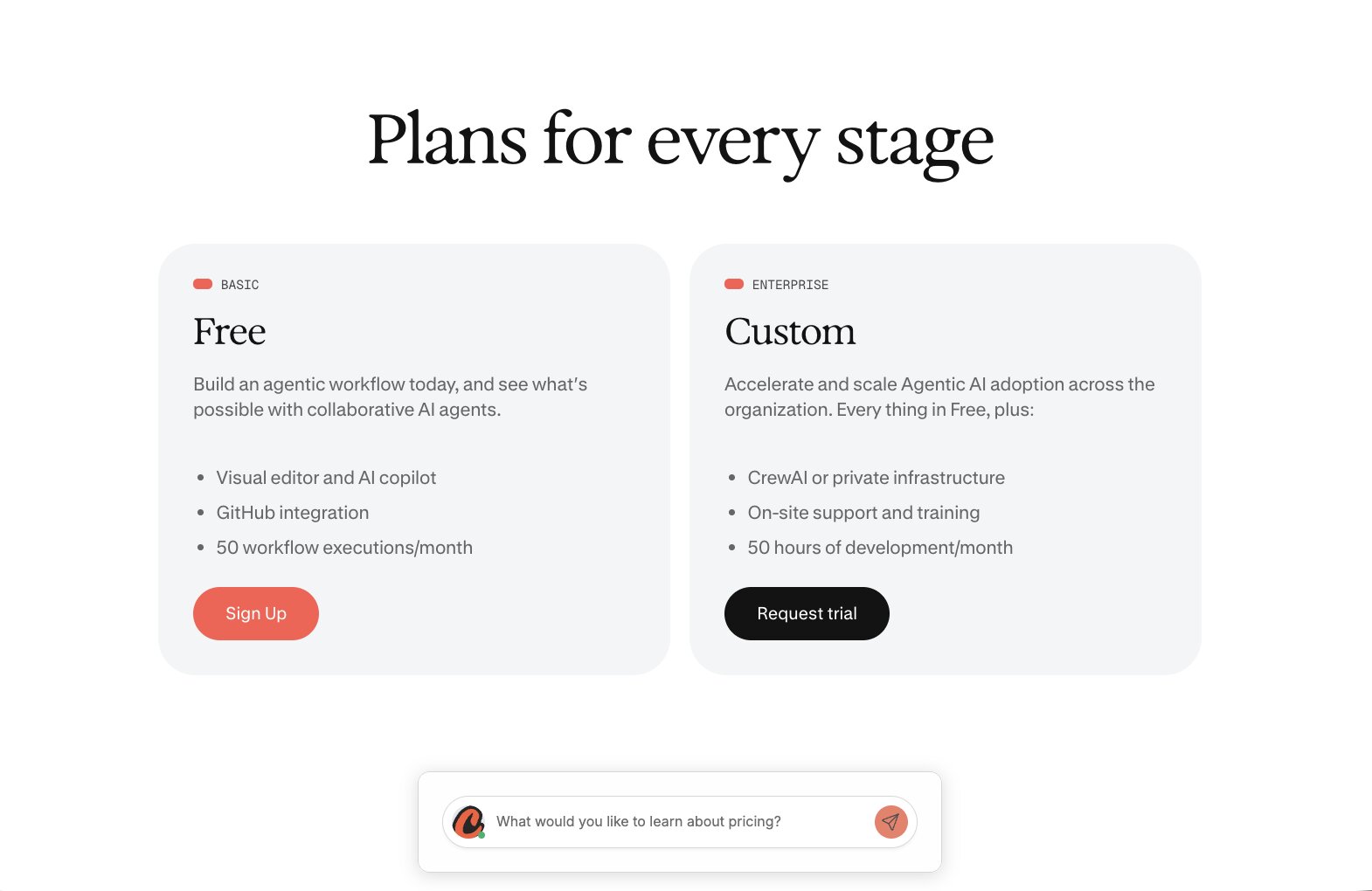
Here are CrewAI's pricing plans:
- Basic: $0/month with the visual editor and AI copilot, GitHub integration, and 50 workflow executions per month
- Enterprise: Custom pricing with SSO, RBAC, workload identity, PII redaction, and policies, deployment on CrewAI cloud, your own VPC, or your own infrastructure, a 45-day onboarding program, and forward deployed engineering and training available a la carte
CrewAI dropped its $25/month Professional plan, so there's no longer a mid-tier option. You go straight from the free plan to an enterprise contract. The open-source framework (CrewAI OSS) is still free and available on GitHub.
You can learn more about how they structure their pricing here.
CrewAI ratings and reviews
Here's what customers rate the platform on third-party review sites:
- G2: 4.5 out of 5 star rating (from +3 user reviews)
- Trustpilot: 3.1/5 star rating (from +2 user reviews)
3. StackAI
- Best for: Enterprise teams in regulated industries like finance, insurance, healthcare, and government
- Pricing: Free plan available (500 runs/month), Enterprise pricing is custom
- What I like: Compliance certifications (SOC 2, HIPAA, GDPR) are already completed and documented, so security and procurement teams can move faster instead of waiting on audits or running vendor-risk exceptions
StackAI is an AI agent builder designed for enterprise companies that operate in regulated industries. It's used by companies like IBM, Nubank, BAE Systems, MIT, and the YMCA Retirement Fund for things like underwriting, contract review, ticket triage, RFP drafting, and CRM enrichment.
The reason I included StackAI on this list is because it bakes governance directly into the platform. Compliance controls, guardrails, PII handling, and data retention policies are core features, not things your security team has to bolt on after the fact. Most alternatives at this level require custom security work or compensating controls to get to the same place. StackAI ships with SOC 2 Type II, HIPAA, and GDPR coverage as platform guarantees, which is pretty unusual for an agent and workflow orchestration tool.
If you're in an industry where compliance and data governance are non-negotiable and your procurement team needs completed audits before they sign off on anything, that's where StackAI fits.
How StackAI works
StackAI gives you a drag-and-drop canvas where you connect nodes for LLM calls, tools, knowledge bases, APIs, and business systems into end-to-end workflows. You can index internal data sources into RAG pipelines, plug in tools to act on systems like Salesforce, SharePoint, SAP, or internal APIs, and then deploy your agents through chatbots, forms, batch processors, or widgets.
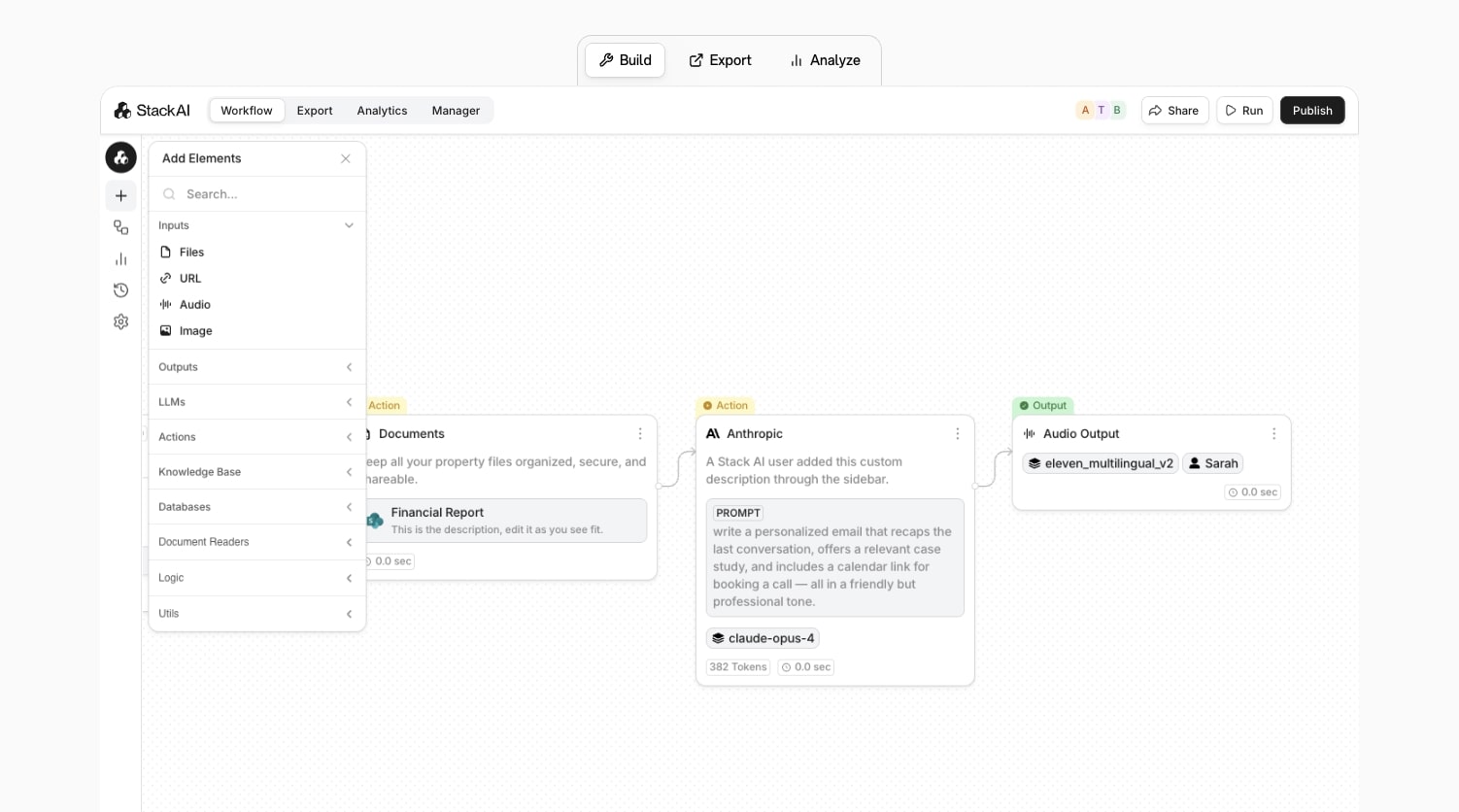
What I find well-designed is the guardrail system. It operates at two levels. At the workflow level, you define global rules that apply to every LLM step in that flow, things like "never expose raw PII in any response" or "never answer medical diagnosis questions." At the individual node level, you can set instructions for specific steps. So a "legal summary" node can be configured to refuse out-of-scope questions while the rest of the workflow runs normally. The workflow rules act as a floor that no node can violate, and node rules let you get more specific where certain steps need it.
The builder itself feels like a polished enterprise workflow engine. Workflows feel more like n8n or Make diagrams than raw LLM graphs, with nodes for forms, approvals, integrations, and LLM steps wired together. There are also pre-built flows for things like contract review, support triage, and RFP assistants, so teams can start from established patterns instead of a blank canvas.
Why choose StackAI over LangChain
Here are some reasons why I'd pick StackAI over LangChain:
- StackAI ships with completed SOC 2 Type II, HIPAA, and GDPR certifications as core platform guarantees. With LangChain, you're responsible for building that compliance layer yourself on top of whatever infrastructure you deploy to. If your security team needs audits done before they approve a vendor, StackAI is already there.
- The platform is built for internal enterprise workflows. Helpdesk bots, onboarding assistants, document parsers, expense agents. LangChain can technically build all of those things, but you're assembling the pieces yourself. StackAI gives you templates and structure for those use cases out of the box.
- LLM nodes include native PII detection and masking, configurable data retention policies, and a no-training-on-customer-data commitment under enterprise agreements. Those are exactly the things a DPO or compliance team is going to ask about before signing off on any AI tooling.
- StackAI supports multiple LLM providers (OpenAI, Anthropic, Google, Meta) and offers flexible deployment options including multi-cloud, VPC, and on-prem. That reduces vendor lock-in compared to building on a single framework.
StackAI pros and cons
Here are some of the pros I've found with StackAI:
- The drag-and-drop builder is clean and one of my favorite UIs in this space. It's opinionated in a way that makes workflows easy to follow for non-ML people, while still exposing enough controls around models, routing, and evals for technical users.
- Enterprise security and compliance is baked in from day one. SOC 2 Type II, HIPAA, and GDPR are completed certifications, not "in progress" placeholders.
- Over 100 data and app connectors (Salesforce, SharePoint, SAP, internal APIs) plus one-click RAG pipelines for document indexing.
- The guardrail system gives you both workflow-level and node-level control over what LLMs can and can't do, which is important when legal or compliance teams need hard boundaries.
- You can deploy agents across web widgets, chatbots, forms, batch processors, and internal tools from the same canvas.
Here are some of the cons I've found with StackAI:
- It's designed for mid-market and enterprise teams. If you're a solo operator or a small startup, the platform is going to feel like overkill for what you need.
- StackAI is more opinionated than open-source tools like Dify. If you want to plug in arbitrary LangChain nodes or tinker with obscure LLM backends, you won't have that kind of raw hackability here. You're expected to stay within its node types.
- The platform assumes a real project cycle with environments, approvals, and governance built in. For quick one-off automations, something like Gumloop or Dify will feel faster to spin up.
- Like any node-based builder, very large workflows can get visually dense and harder to navigate. StackAI mitigates this with structure and templates, but you'll still hit the usual canvas-at-scale problems.
StackAI pricing
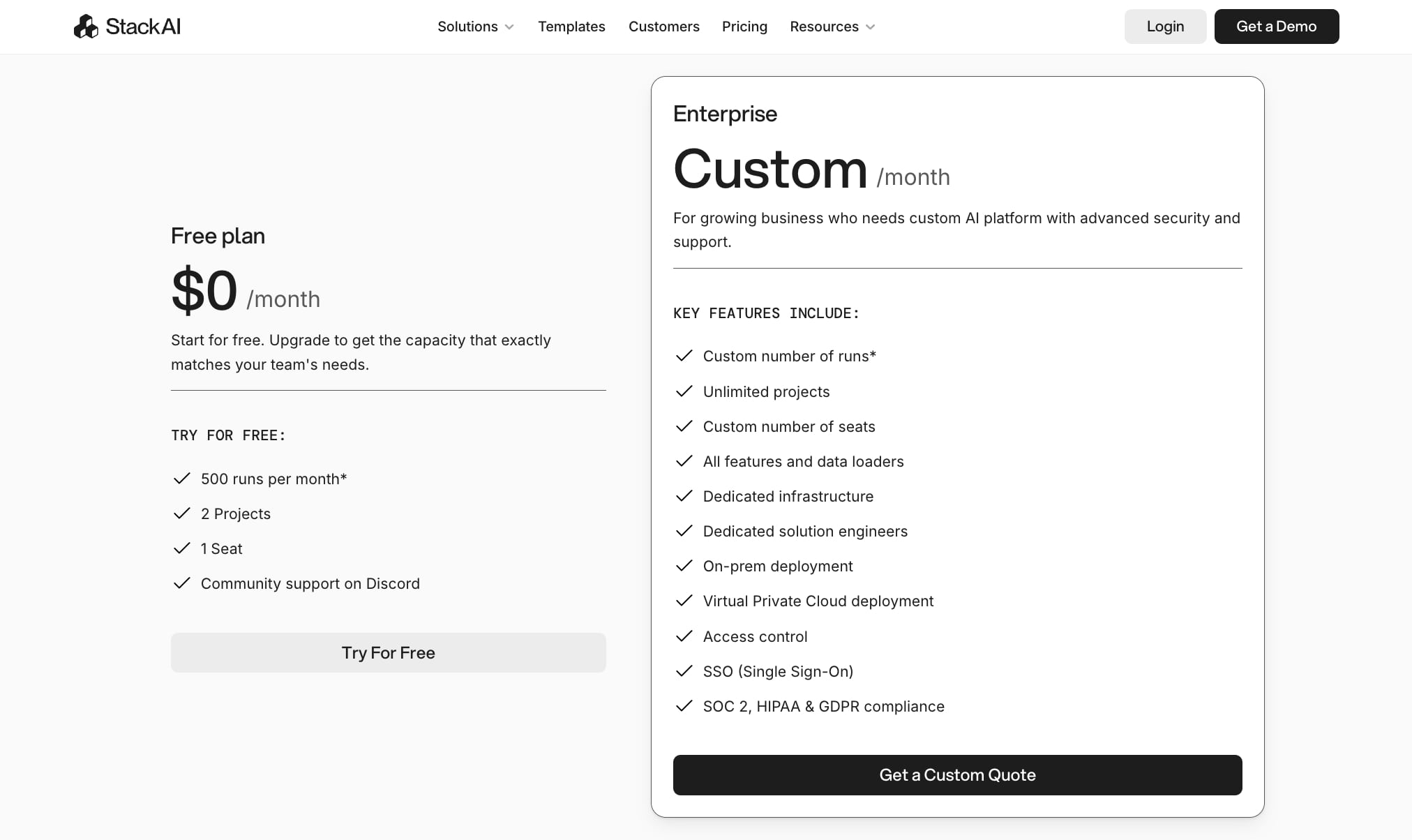
Here are StackAI's pricing plans:
- Free: $0/month with 500 runs per month, 2 projects, 1 seat, and community support on Discord
- Enterprise: Custom pricing with custom number of runs, unlimited projects, custom number of seats, all features and data loaders, dedicated infrastructure, dedicated solution engineers, on-prem deployment, Virtual Private Cloud deployment, access control, SSO, and SOC 2, HIPAA, and GDPR compliance
You can learn more about how they structure their pricing here.
StackAI ratings and reviews
Here's what customers rate the platform on third-party review sites:
- G2: 4.5/5 star rating (from +38 user reviews)
- Slashdot: 4.4/5 star rating (from +9 user reviews)
4. Make
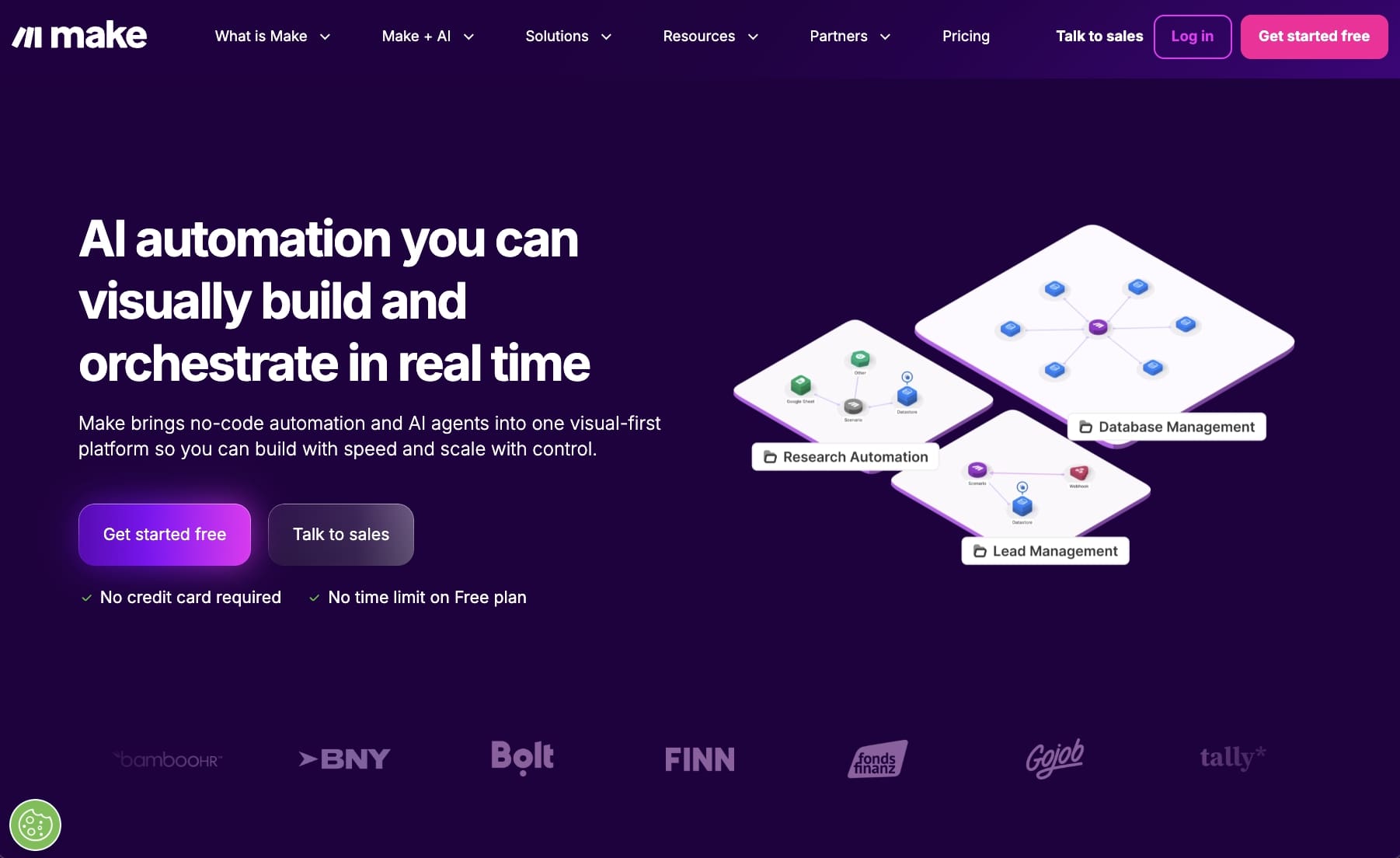
- Best for: Non-technical teams who want budget-friendly workflow automation with AI features
- Pricing: Free plan available (1,000 credits/month), paid plans start at $10.59/month
- What I like: Over 3,500 app integrations, a clean drag-and-drop interface, and one of the cheapest options out there
Make (used to be called Integromat) is an automation platform that's been around for a while now. It got popular as a cheaper alternative to Zapier, and for good reason. The pricing is way more friendly, especially for small teams or people just getting started.
I've used Make on and off over the years, and the thing that stands out to me is how visual it is. You build workflows on a canvas by connecting modules together, kind of like a flowchart. You can add triggers, actions, routers, filters, and conditional logic. I like that I can see what's happening at every step, especially when things get more complex.
Make also added AI-specific modules over the last couple of years. You can drop in LLM nodes (like OpenAI) and use built-in AI tools for things like classification and summarization. Make AI Agents (in beta) and Maia, which builds scenarios from a chat prompt, are now included on every plan too.
Marketing, ops, sales, and customer service teams use it the most to connect their tools together and automate repetitive stuff.
How Make works
In Make, you build what they call "scenarios." Each scenario starts with a trigger (like a new row in a spreadsheet or a new email) and then connects to actions, routers, and filters that control the flow of data. You configure everything through forms where you map data fields and set conditions.
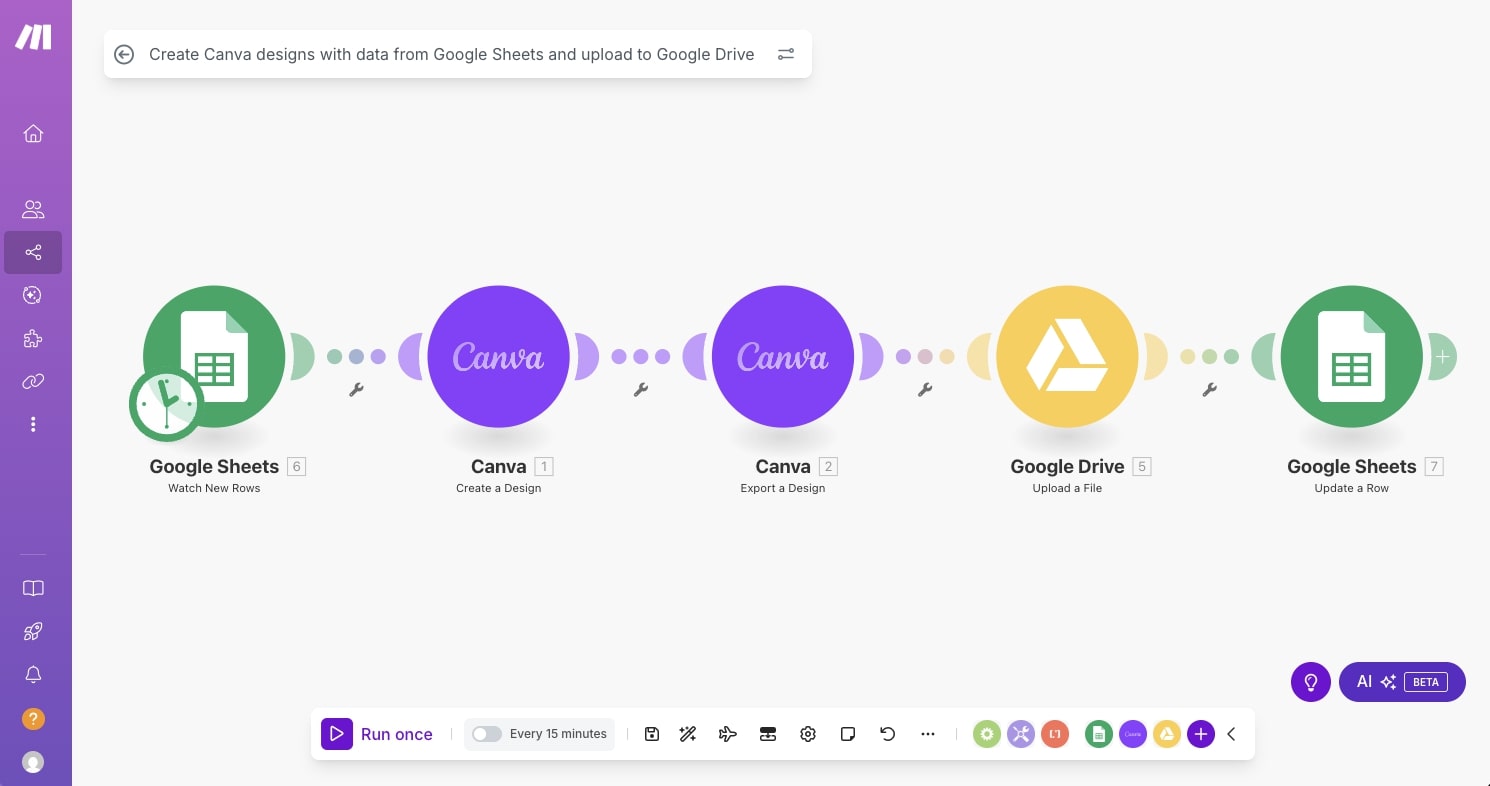
You can schedule scenarios to run automatically or trigger them based on events. Make supports HTTP requests, webhooks, and data transformation, so you can get pretty creative with how you move data between apps. You're not limited to simple A-to-B connections. You can build branching logic, run multiple paths in parallel, and format data between steps without needing any external tools.
The AI modules let you add LLM-powered steps into your scenarios too. So something like taking a bunch of customer support tickets, running them through an AI model for classification, and routing them to the right team automatically, you can build that whole thing on the canvas.
Why choose Make over LangChain
Here are some reasons why I'd pick Make over LangChain:
- Make connects AI agents with over 3,000 business apps like your CRM, marketing tools, and finance software. LangChain focuses on building AI applications in code. I think Make covers way more ground for people who need AI plugged into their existing stack without writing Python.
- The drag-and-drop canvas and built-in AI modules let ops, marketing, and support teams build workflows without depending on engineering. LangChain requires coding and infrastructure knowledge that most non-developers don't have.
- Make has been around for years and handles webhooks, data transformation, and role-based access control really well. I'd pick it over LangChain for anyone who wants agents embedded into their day-to-day systems and doesn't write code.
- The pricing is great if you're on a budget. You can start for free and paid plans begin at $10.59/month, which is a fraction of what most AI platforms charge.
Make pros and cons
Here are some of the pros I've found with Make:
- The visual builder is easy to use even with zero coding experience. You can build complex scenarios with branching, scheduling, and conditional logic without writing a single line of code.
- Over 3,000 pre-built app connectors plus generic HTTP and webhook modules let you connect AI to almost anything you're already using.
- Native AI agents and LLM modules come built in, so you don't have to do a bunch of prompt engineering or glue-code to get AI into your workflows.
- The data mapping and transformation features are solid. You can filter, format, and reshape data between steps without needing anything else.
- It's one of the most affordable platforms in this space, especially at higher task volumes where other tools get expensive fast.
Here are some of the cons I've found with Make:
- Make isn't built for developers who want full programmatic control. LangChain and CrewAI give you way more flexibility with code and git-native workflows.
- Big scenarios with a lot of branches get visually cluttered and harder to keep track of over time.
- There's a real vendor lock-in risk. Building heavily on Make's proprietary modules makes migrating to another platform later pretty painful.
- The free tier is generous, but costs add up once you start running a lot of high-frequency automations or bring on a bigger team.
Make pricing
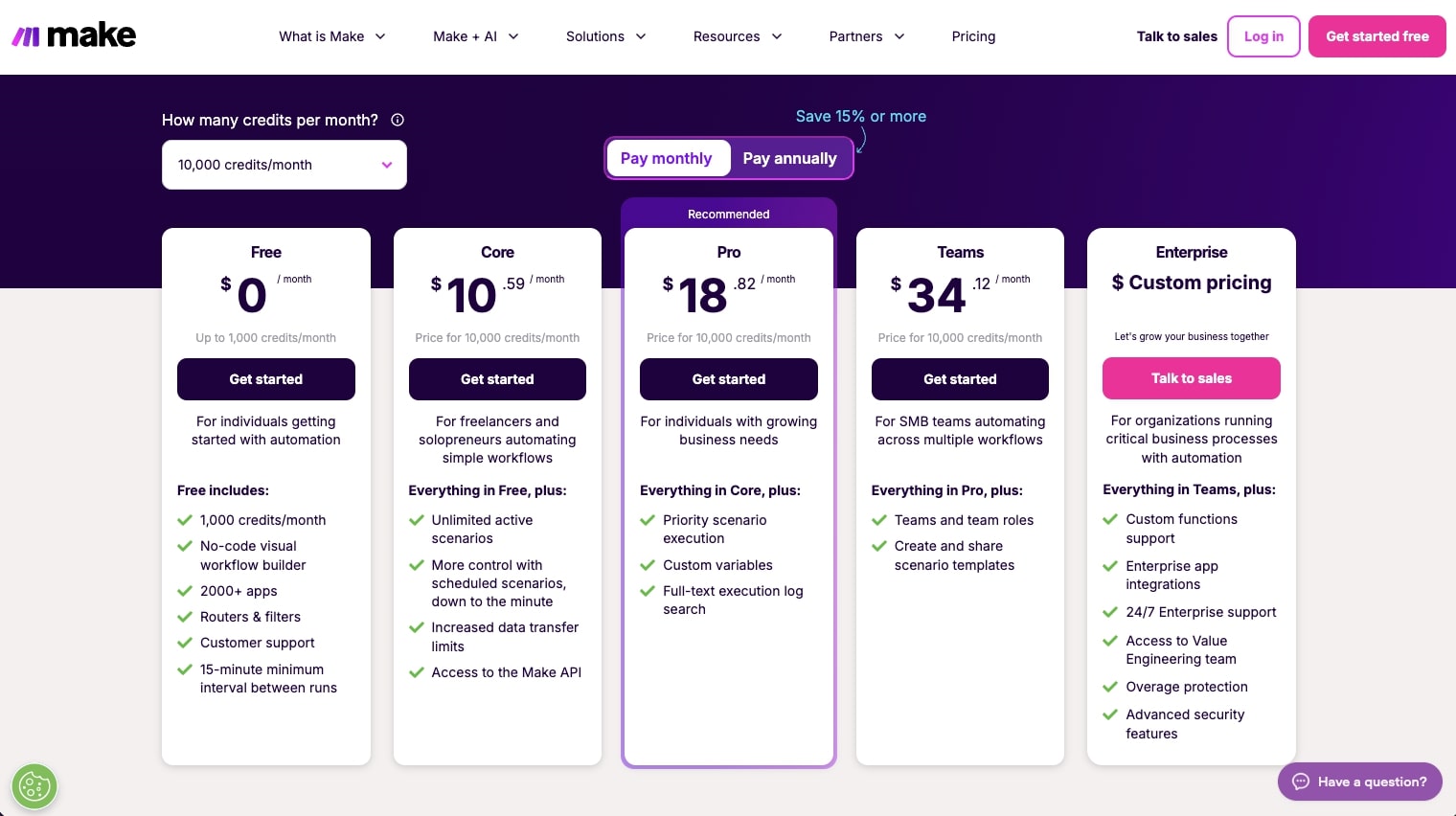
Here are Make's pricing plans:
- Free: $0/month with 1,000 credits per month, no-code visual workflow builder, 3,500+ apps, routers and filters, customer support, and a 15-minute minimum interval between runs
- Core: $10.59/month for 10k credits with unlimited active scenarios, scheduled scenarios down to the minute, increased data transfer limits, and access to the Make API
- Pro: $18.82/month for 10k credits with priority scenario execution, custom variables, and full-text execution log search
- Teams: $34.12/month for 10k credits with team roles and the ability to create and share scenario templates
- Enterprise: Custom pricing with custom functions support, enterprise app integrations, 24/7 enterprise support, access to the Value Engineering team, overage protection, and advanced security features
You can learn more about how they structure their pricing here.
Make ratings and reviews
Here's what customers rate the platform on third-party review sites:
- G2: 4.6/5 star rating (from +273 user reviews)
- Capterra: 4.8/5 star rating (from +406 user reviews)
5. Zapier
- Best for: Non-technical teams who want to layer AI into their existing automations
- Pricing: Free plan available (100 tasks/month), paid plans start at $29.99/month ($19.99/month billed annually)
- What I like: Integrates with basically every SaaS tool out there, low learning curve, and a long track record of reliability
Zapier is the OG of automation platforms. I've been paying for a Zapier subscription for years now, and it's probably the first tool most people discover when they google "how to automate" anything.
It deserves a spot on this list, but I want to be clear about what it actually is. Zapier is still primarily an automation platform. It just now has AI agent features layered on top that make it a lightweight LangChain alternative for a lot of business use cases.
Where it overlaps with LangChain is Zapier's AI Actions and Agents. You can define agent behavior in natural language and let the system choose from thousands of connected app actions. That's conceptually similar to a tool-using agent chain. You can create specialized agents for things like lead qualification, ticket routing, or content generation that pull from data sources like HubSpot, Zendesk, and Notion, and then take actions automatically.
Zapier wraps all of this in a visual workflow builder with triggers, filters, branches, and multi-step flows, which covers a lot of the orchestration that people otherwise reach for LangChain plus a separate workflow engine to build.
How Zapier works
In Zapier, you create "Zaps." Each Zap starts with a trigger (like a new row in a spreadsheet or a new form submission) followed by one or more actions (like sending a Slack message or creating a CRM record). You set everything up through a step-by-step UI where you pick your apps, map fields, add conditional logic, and optionally include AI steps for things like classification, summarization, or content generation.
Zapier also recently rolled out a dedicated Agents product. You can build AI agents that browse the web, connect to live data sources, and take actions across your apps. These agents run as a separate add-on with their own activity limits and pricing.
On top of that, Zapier unified their platform so that Zaps, Tables, Forms, and Copilot are all available in one plan. So you get data, custom forms, workflows, and AI actions all in one package.
Why choose Zapier over LangChain
Here are some reasons why I'd pick Zapier over LangChain:
- Zapier integrates with way more SaaS apps than anything you'd build with LangChain. Thousands of connectors are ready to go out of the box. LangChain requires you to build or configure every integration yourself.
- For straightforward automations like notifications, lead routing, or data enrichment with an AI step, Zapier is faster to set up. You don't need to think about RAG pipelines, agent architectures, or infrastructure.
- Zapier has been around for a long time and has mature enterprise features like SSO, audit logs, compliance, and granular permissions. It's a safe bet for organizations that need a reliable automation backbone with some AI added in.
- Non-technical teams can build useful automations in minutes using templates and the guided editor. LangChain requires Python or TypeScript skills and infrastructure knowledge.
Zapier pros and cons
Here are some of the pros I've found with Zapier:
- The learning curve is one of the lowest in this space. Non-technical users can get a useful automation running quickly using templates and the step-by-step builder.
- The integration catalog is massive. Thousands of apps out of the box, plus generic webhooks and APIs for anything custom.
- Zapier Copilot helps you build Zaps, generate code steps, map fields, and troubleshoot errors using AI. It speeds up the building process a lot.
- The infrastructure is fully hosted and managed. You don't have to worry about scaling, retries, or monitoring.
- The new Agents product lets you build AI agents that browse the web and take actions across your apps, which adds real agentic capabilities on top of the traditional automation model.
Here are some of the cons I've found with Zapier:
- Zapier's AI runs inside a trigger-then-steps model. You get AI steps and agents within that structure, but you don't get arbitrary graph control, low-level state management, or custom execution logic like LangChain and LangGraph give you.
- Task-based pricing adds up fast, especially when you're chaining a lot of small actions together in multi-step workflows. The AI Agents add-on has its own separate pricing and activity limits on top of that.
- Your logic lives inside proprietary Zaps, which makes versioning, code review, and migrating to another platform harder than it would be with code-based or open-source tools.
- For most AI-powered automation use cases, I think Gumloop handles them better. Zapier's main advantage is that your team might already be using it and you don't want to move everything.
Zapier pricing
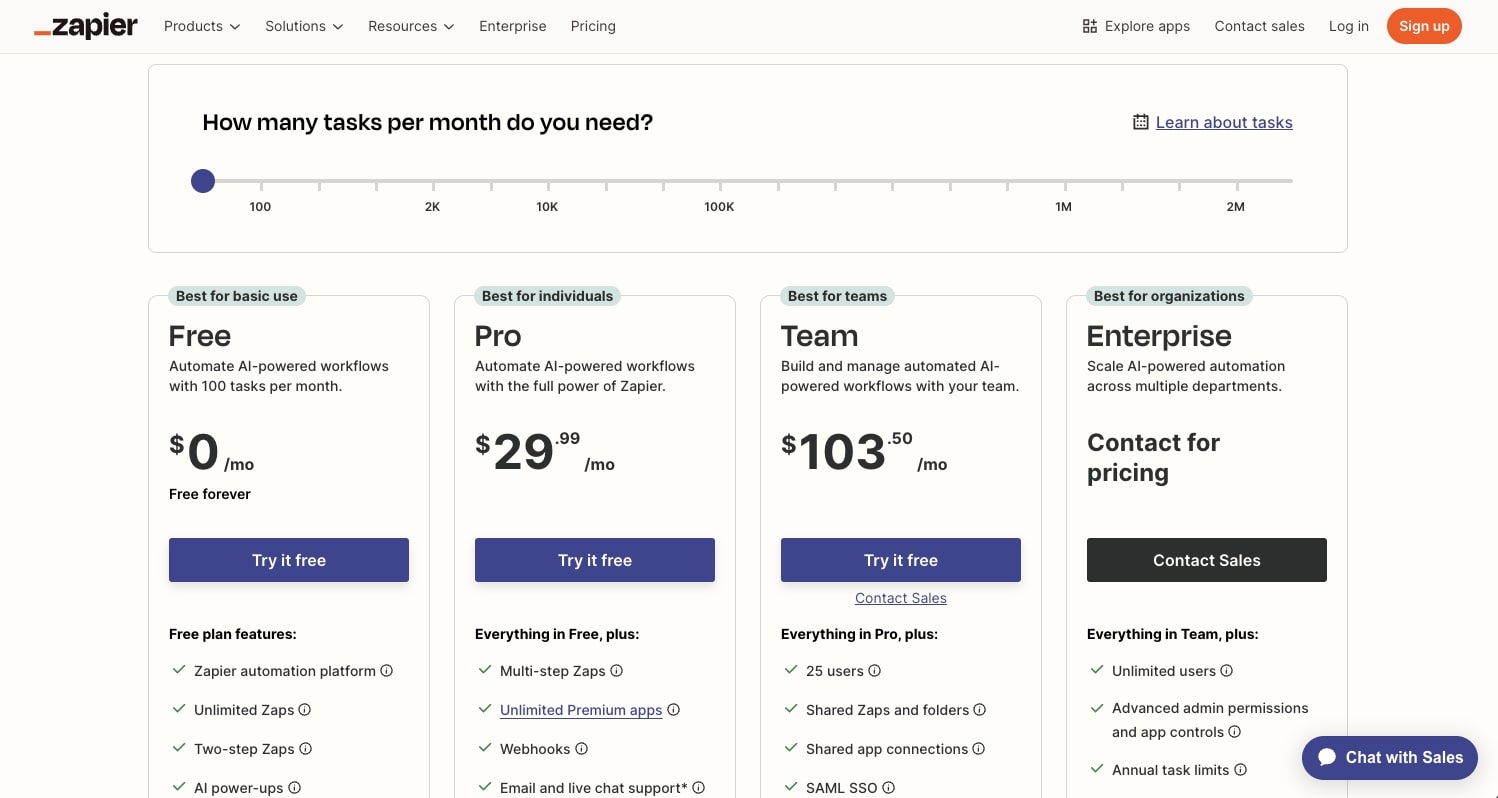
Here are Zapier's pricing plans:
- Free: $0/month with 100 tasks per month, unlimited Zaps, Tables, and Forms, two-step Zaps, and Zapier Copilot (with daily message limits)
- Professional: $29.99/month ($19.99/month billed annually) with multi-step Zaps, unlimited premium apps, webhooks, email and live chat support, AI fields, and conditional form logic
- Team: $103.50/month ($69/month billed annually) with 25 users, shared Zaps and folders, shared app connections, SAML SSO, and priority support
- Enterprise: Custom pricing with unlimited users, advanced admin permissions and app controls, advanced deployment options, annual task limits, observability, and a Technical Account Manager
Zapier also has a separate AI Agents add-on:
- Free: $0/month with 400 activities per month, live data sources, web browsing, and Chrome extension access
- Pro: $33.33/month billed annually ($400 per year) with 1,500 activities per month and all free features
- Enterprise: Custom pricing with custom activities, agent sharing across your organization, enterprise-grade audit logs, and restricted apps support
You can learn more about how they structure their pricing here.
Zapier ratings and reviews
Here's what customers rate the platform on third-party review sites:
- G2: 4.5/5 star rating (from +1,854 user reviews)
- Capterra: 4.7/5 star rating (from +3,041 user reviews)
6. Dify AI
- Best for: Technical teams who want an open-source, self-hostable platform for building agents, RAG apps, and AI workflows visually
- Pricing: Free to self-host (Community edition). Dify Cloud has a free Sandbox plan, and paid plans start at $59/workspace per month
- What I like: A visual canvas and a built-in knowledge base for RAG in one tool, and you can run the whole thing on your own infrastructure for free
Dify is an open-source platform for building AI agents, RAG apps, and AI workflows on a visual canvas. It's one of the most popular open-source AI projects on GitHub, with more than 140,000 stars.
I added it in this update to replace Flowise, which shut down in August 2026. Dify fills the same spot on this list. It's a visual, self-hostable way to build LLM apps without writing all the plumbing yourself.
Where it overlaps with LangChain is everything around the model. Prompt orchestration, tool calling, agents, retrieval, and model switching are all built in, and you get them through a UI instead of a Python library.
How Dify AI works
You build apps in Dify's Studio. You can start with a simple chatbot or agent, or open the workflow canvas and connect nodes for LLM calls, knowledge retrieval, code, conditions, and tools. Chatflows are the conversational version with memory, and workflows handle multi-step jobs that run on their own.
The Knowledge section is where RAG happens. You upload documents or sync data sources, Dify chunks and indexes them, and any app can pull from that knowledge base. You can plug in models from OpenAI, Anthropic, Google, and many open-source providers, and extend Dify with plugins from its marketplace.
When an app is ready, you can publish it as a web app, embed it on a site, or call it through an API. Workflows can also start on their own from schedules, webhooks, or plugin triggers.
Why choose Dify AI over LangChain
Here are some reasons why I'd pick Dify over LangChain:
- You get a visual builder for agents and workflows instead of writing chains in code. It's much faster to see what each step is doing and fix it.
- RAG is built in. Document upload, chunking, indexing, and retrieval are handled in the Knowledge section, so you don't have to assemble loaders, splitters, and vector stores yourself.
- Apps ship as an API or a web app in a few clicks, which saves you from building a separate backend and frontend around your chain.
- You can self-host the Community edition for free, so your data stays on your own infrastructure.
Dify AI pros and cons
Here are some of the pros of Dify:
- A huge open-source community and an active plugin marketplace.
- Visual canvas, built-in RAG, and logs and annotations for improving responses, all in one place.
- Works with a wide range of proprietary and open-source models, so you can swap providers without rebuilding.
- Free to self-host, with a free cloud Sandbox plan if you want to try it before setting up servers.
Here are some of the cons of Dify:
- It's built for developers and technical teams. Non-technical users can get started, but concepts like chunking, embeddings, and variables show up fast.
- Dify's license is based on Apache 2.0 with extra conditions, so read it before you build a multi-tenant product on top of it.
- Self-hosting means you own updates, scaling, and uptime.
- It isn't built to connect hundreds of business apps out of the box the way platforms like Gumloop, Make, or Zapier are.
Dify AI pricing
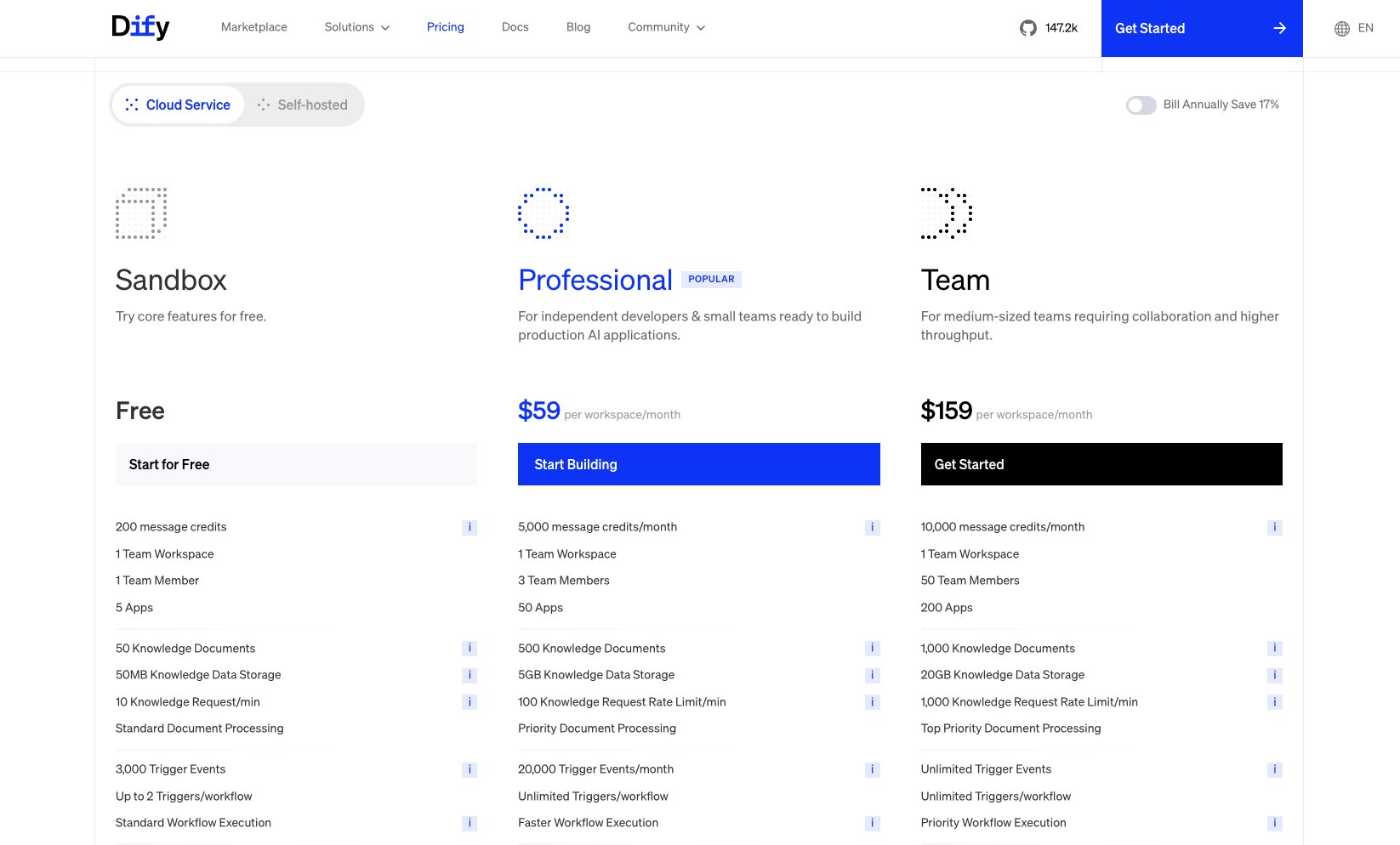
Dify is free to self-host. For Dify Cloud, here are the pricing plans:
- Sandbox: $0/month with 200 message credits, 1 team member, 5 apps, 50 knowledge documents, and 50MB of knowledge storage
- Professional: $59/workspace per month with 5,000 message credits per month, 3 team members, 50 apps, 500 knowledge documents, and 5GB of knowledge storage
- Team: $159/workspace per month with 10,000 message credits per month, 50 team members, 200 apps, 1,000 knowledge documents, and 20GB of knowledge storage
- Enterprise: Custom pricing with scalable deployment, a commercial license, multiple workspaces, SSO, negotiated SLAs, and professional technical support
Annual billing saves about 17%. You can learn more about how they structure their pricing here.
For more options in this category, see these Dify alternatives and the best open-source AI agents.
7. Gemini Enterprise Agent Platform (formerly Vertex AI)
- Best for: Teams already on Google Cloud who want a fully managed platform to build, run, and govern AI agents
- Pricing: Pay as you go (agent compute, memory, storage, and model tokens). New Google Cloud customers get $300 in free credits
- What I like: Agent Studio for low-code building, the Agent Development Kit (ADK) for code, and 200+ models through Model Garden, all inside Google Cloud
Vertex AI was Google Cloud's managed AI platform. In April 2026, Google brought its agent tools together under a new name, Gemini Enterprise Agent Platform, and said all Vertex AI services and roadmaps now ship through it. So if older tutorials point you to Vertex AI Agent Builder, this is where it lives now.
Because it's part of Google Cloud, it can replace a lot of what you would otherwise build with LangChain plus a separate infrastructure layer. But I will admit that LangChain is still the more flexible, cloud-agnostic developer library. Agent Platform is the opinionated, Gemini-focused platform you build on top of.
I included it on this list because for teams that run on GCP, it covers a lot of what LangChain does and then some, with the added benefit of everything being managed for you.
How Gemini Enterprise Agent Platform works
Most teams start visually in Agent Studio, the low-code designer, where you wire up Gemini, tools, and company data. When you need more control, you drop into Python with the Agent Development Kit (ADK) to customize logic and add custom tools, then deploy to Agent Runtime, which supports long-running, stateful agents. Memory Bank gives agents persistent context across sessions.
The typical workflow I've seen is prototype visually, then lock the stable version into code for version control, testing, and integration into a broader app or backend. It's a blend of low-code for speed and the SDK for control.
Beyond agents, you get 200+ models through Model Garden, including Gemini, Gemma, and third-party models like Anthropic's Claude. There's also built-in governance with Agent Identity, Agent Registry, and Agent Gateway, plus Agent Simulation, Evaluation, and Observability for testing agents and tracing what they did.
It's a full platform. Not just an agent builder.
Why choose Gemini Enterprise Agent Platform over LangChain
Here are some reasons why I'd pick it over LangChain:
- It's a fully managed platform. You don't have to set up infrastructure, manage deployments, or build your own monitoring. LangChain requires you to handle all of that yourself (or pair it with LangSmith plus your own cloud infrastructure).
- You get native access to Gemini and 200+ models through Model Garden without juggling separate API keys and billing for each provider.
- Agent Studio gives you a visual way to prototype agents quickly, and the ADK lets you customize in Python when you need more control. LangChain only gives you the code path.
- Governance is built in. Agent Identity, Registry, and Gateway give IT one place to control which agents exist and what they can reach. With LangChain, you'd build that layer yourself.
Gemini Enterprise Agent Platform pros and cons
Here are some of the pros I've found:
- Access to Gemini and over 200 foundation models from one platform. You can swap between first-party, third-party, and open-source models without changing your infrastructure.
- Agent Studio, the ADK, Agent Runtime, Memory Bank, and evaluation tools all live in one place. You don't have to stitch together separate tools.
- Everything is managed by Google Cloud. Compute, scaling, monitoring, and security are handled for you.
- New Google Cloud customers get $300 in free credits to test things out, which is enough to run meaningful experiments.
Here are some of the cons I've found:
- The GCP lock-in is real. Your agent design, data, tools, and deployment all live inside Google's ecosystem. Migrating to something like Dify or Gumloop later means rebuilding connectors, RAG assets, and integration logic from scratch.
- Pricing gets complicated fast. Compute, memory, storage, sessions, and model tokens are each billed separately, so the total can be hard to predict once you're running real traffic.
- It's Gemini-centric. You can use other models through Model Garden, but the platform is clearly built around Google's own models.
- The rename means a lot of tutorials and forum answers still say Vertex AI, which can make current instructions harder to find.
Gemini Enterprise Agent Platform pricing
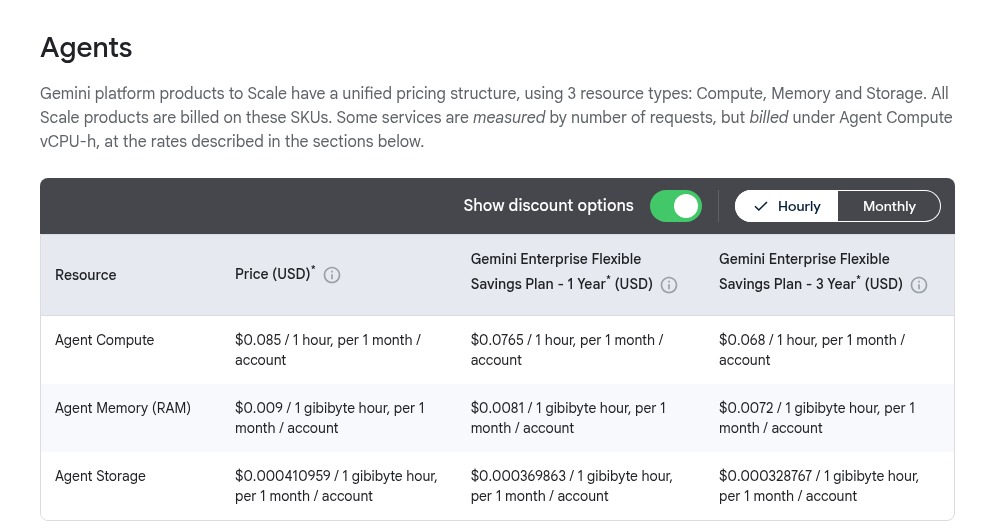
Agent Platform uses pay-as-you-go pricing. Here are the main pieces:
- Agent compute: $0.085 per vCPU-hour for agents on Agent Runtime and sandbox environments like code execution and computer use
- Agent memory: $0.009 per GiB-hour of RAM allocated to your agents
- Model usage: Billed per million input and output tokens, with rates that vary by model
- Storage, sessions, and Memory Bank: Billed separately based on how much you store and retrieve
- Flex savings plans: Lower compute rates with a commitment, about $0.0765 per vCPU-hour on a 1-year plan and $0.068 on a 3-year plan
New customers get $300 in free credits to try Agent Platform and other Google Cloud products.
The pricing is technically predictable since each component has a per-unit rate. But in practice, the bill can get complicated once you're running agents, RAG stores, model serving, and other GCP services together. Teams that manage costs well tend to scope traffic tightly, pick cheaper models for high-volume flows, and set hard spending limits from the start.
You can learn more about how they structure their pricing here.
Gemini Enterprise Agent Platform ratings and reviews
Here's what customers rate the platform on third-party review sites, where it's still listed as Vertex AI:
- G2: 4.3/5 star rating (from +180 user reviews)
- Gartner Peer Insights: 4.3/5 star rating (from +40 user reviews)
Frequently asked questions about LangChain alternatives
What is the best alternative to LangChain?
It depends on who's building. For business teams and non-developers, Gumloop is the most complete option because you can build agents without code. For Python developers, CrewAI is the closest swap for multi-agent work. And if you want something open source and self-hosted with a visual builder, go with Dify.
Is there an open-source alternative to LangChain?
Yes. CrewAI's core framework is open source and free on GitHub, and Dify can be self-hosted for free under its own open-source license. If your project is mostly retrieval over documents, LlamaIndex is another popular open-source option built specifically for RAG.
What's a good LangChain alternative for TypeScript?
LangChain has a JavaScript and TypeScript version (LangChain.js), so you don't have to leave the ecosystem to use TypeScript. If you want a TypeScript-first framework built for agents from the ground up, Mastra is worth a look. It ships with agents, workflows, memory, MCP support, and observability out of the box.
Is LangGraph an alternative to LangChain?
Not really. LangGraph is made by the same team. It's the lower-level orchestration layer for stateful, multi-step agents, and LangChain's agents now run on top of it. If LangChain feels too abstract, LangGraph gives you more control. If it feels too technical, a platform from this list will be a better fit.
What happened to Flowise?
The Flowise team announced in July 2026 that they were winding down the project. The GitHub repo was archived on August 10, 2026, and official support ended on August 31, 2026. The Apache 2.0 code is still there to fork, but it's no longer maintained, which is why I took it off this list. If you were using it, here are the best Flowise alternatives.
Which LangChain alternative should you choose?
If you've made it this far, you probably already have a good sense of which tool fits your situation. But if you're still deciding, here's how I'd break it down.
If you want a single platform where anyone on your team can build AI agents and workflows without writing code, go with Gumloop. It's what I use personally, and it's the most complete option on this list for non-developers who still want serious AI capabilities.
If you're a developer who wants a Python framework specifically for multi-agent orchestration, CrewAI is a strong pick. The agent-task-crew model is intuitive and you'll prototype way faster than building equivalent setups in LangChain from scratch.
And if you're at an enterprise company in a regulated industry where compliance is the top priority, StackAI is worth a look. The certifications are already done and the guardrail system is built for teams that need hard boundaries around what AI can and can't do.
If you want an open-source platform you can self-host, start with Dify. And if CrewAI is close but not quite right, here are some CrewAI alternatives worth testing.
At the end of the day, the best tool is the one that actually helps you get work done faster. I started this whole search because LangChain felt like overkill for what I needed. If you're in the same boat, pick one or two tools from this list, build the same workflow in both, and see which one gives you moments of delight (how I vibe-evaluate tools). That's the fastest way to find out what works for you.
Now go build something.

Read related articles
Check out more articles on the Gumloop blog.