7 best AI agent builders you need to try in 2026

When you find the right AI agent builder, it completely changes your perspective on AI and work.
I used to be really skeptical about these tools. AI agents seemed like just another buzzword for automated workflows. But as new platforms started popping up, I realized they're actually a totally different technology.
Over the past year, I've been using AI agents in my marketing agency. I've tested over a dozen of these platforms that promise to build you an AI employee workforce so you can kick your feet up on your desk and do nothing.
While we aren't quite there yet, we are pretty close to having AI handle a lot of IC level tasks.
And through my own experience using this technology in my work, I've found a few AI agent builders that seriously deserve some attention.
So in this article, I'm going to show you the best AI agent builders on the market right now. I'll tell you what each tool is best for, where their limitations are, and who should use them.
Okay, let's get into it.
What is an AI agent builder?
An AI agent builder is a platform that allows you to create agentic workflows that can integrate with your existing tools and complete tasks without human interference.
While it may seem like the next tech buzz trend, AI agents for business are actually a real thing and can help automate a lot of repetitive tasks that you already do at work.
Whether you're a customer support team trying to get help with answering more support tickets, a marketing team trying to get help with doing competitor research and generating reports, or a solo creator who needs help responding to business inquiries, there's an AI agent for everything.
I like to think of AI agents as junior level employees that can not only follow your instructions but also begin to make their own decisions without you being involved. This means to get the most out of AI agents, you should deeply understand an existing workflow that you want to automate.
I always tell people that you can only automate what you can articulate. So don't expect AI agents to magically do all your work for you while you step away from your computer. To make them work, they need a lot of data, context, and training. But if you can do that, you can build a powerful AI agent that can save you hours each week.
Can I build my own AI agent?
Yes, you can build your own AI agent and there are lots of no-code AI agent makers out there to help you do it even if you're not a technical person. Most of them also have a free plan or free trial, so you can test drive a free AI agent builder before you pay for anything. There are also AI agent builders for technical people that are a bit more advanced and require you to have previous programming experience.
However, in this article I'm going to give you a mix of both and I'm going to prioritize the platforms that can do most of the heavy lifting for you. But before you jump right in, I think it's really important to know how to evaluate these tools for yourself and your own use cases.
And if you'd rather use ready-made agents instead of building your own, check out this list of agentic AI tools.
So let's go over that first.
What to look for in an AI agent builder
I can simply tell you what the best AI agent builders are out there. And to be honest, my favorite ones are Gumloop, n8n, and Zapier.
But that's just me giving you general advice, which can be quite dangerous given that I don't know the nuances of your business and your specific use cases.
And that's why I think every piece of content you consume around finding the best tools for a certain outcome still requires you to have critical thinking to make sure that it's actually the right platform.
You never want to just blindly listen to someone's recommendation.
So here are some things to consider before you pick an AI agent builder, so you can make your own informed decision:
- Make sure the platform can integrate with multiple LLM models. Different models like Anthropic's Claude or OpenAI's ChatGPT are better and worse at different things. Some are really good at writing tasks, others are great at writing code, and some are good at researching and understanding data. Choose an AI agent builder that allows you to be flexible with the type of model you're able to use.
- Make sure the platform can integrate with your existing tech stack. No sales team wants to learn a new CRM and no marketing team wants to learn a new project management tool. Make sure the platform you pick can seamlessly integrate with the tools you're already using.
- If you're not that technical, make sure the AI agent builder you use has a built-in AI assistant to help you debug any issues with your workflow. Most of the tools below have a visual builder, but only a few of them actually have a chatbot that you can interact with that can help you build out your AI agents.
- Make sure that reputable companies are already using the tool that you want to use. This is important if you care about security and scalability. For example, some of the tools on this list are used by brands you and I interact with every day, while some of them are only used by small businesses. Again, depending on who you are, pick the tool that your industry-friendly competitors use.
Those are the main things to look out for. Of course, there are some other things like pricing and good customer service, but those are a given. I wanted to give you something specific that not everyone may tell you when finding an agent framework for your organization.
Okay, no more rambling from me. Let's get right into the best AI agent builders for 2026.
7 best AI agent builders and tools in 2026
Here are the best AI agent builders:
Alright, let's go over each of these.
1. Gumloop
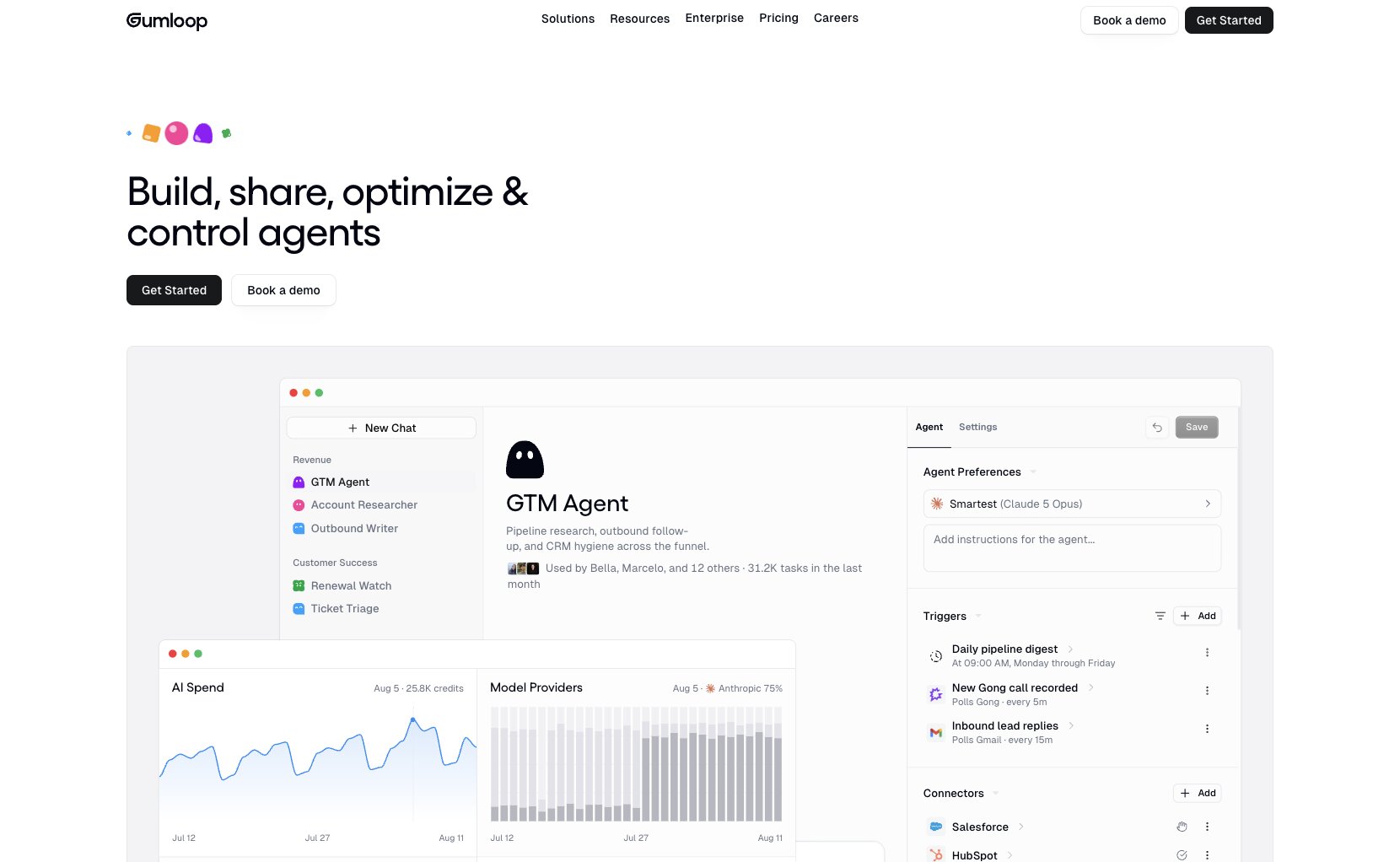
- Best for: Solo operators to enterprise teams across marketing, sales, customer service, HR, and operations
- Pricing: 14-day free trial, then starts at $37/month
- What I like: Unlimited seats, 35+ AI models without extra API keys, and MCP integration for any tool
Gumloop is an AI agent builder and automation platform built for enterprise companies. It's used by some big teams at companies like Shopify, Instacart, and Webflow, across multiple organizations like marketing, sales, operations, finance, customer service, HR, and admin.
What sets Gumloop apart from most of the platforms on this list is how teams actually work in it. It's not just a single player tool where one person owns the build locally or on their own account. Anyone on your team with the right permissions can create an agent or skill, and the rest of the org can run it.
And the agents tend to get sharper the more people use them. Feedback and edits from the people doing the work flow back into the agent, so the improvements compound for everyone else relying on it.

On my own marketing team, I have a small library of agents we share. I keep a chief of staff agent that handles weekly task triage and assigns work across the team. I also have multple SEO agents (my specialty) that my copywriters pull from for keyword research, briefs, and on-page SEO optimization. None of them had to build those agents themselves, they just use them like custom internal apps.
Here are some things I like about Gumloop:
- Anyone with the right access can build agents and skills the whole org can use, which makes it a real team platform instead of a single-user tool
- The platform has multiple integrations and can even create AI Slack agents that act as AI employees right inside of your existing collaboration tools
- It hosts and proxies MCP servers through guMCP, so you can connect your agents to pretty much any tool with an MCP endpoint without managing servers yourself
- Agents can now work on pretty much any website through Gumloop Browser, with credential vaults, 1Password support, and session replays
- You can try it free for 14 days, and the Pro plan is quite affordable compared to others on this list
- Paid plans include unlimited seats. You're billed on credits at the org level instead of per user, which makes it simple to roll out company-wide
Here are some things that can improve with Gumloop:
- The team is constantly shipping new features, so things may shift around in the UI
- Because the platform is still growing, there's not a huge community ecosystem yet like there are with tools like Zapier or n8n (this can also be an opportunity if you are an automation consultant or a creator)
- A few of the higher-end controls (Virtual Private Cloud and AI Model Access Control specifically) are only on the custom Enterprise tier
Overall, Gumloop is my favorite AI agent builder and I use it almost every day. But I'm trying to be as unbiased as possible, so I do have some other agent builders that I would recommend depending on your use case or job role, so keep reading.
Gumloop pricing
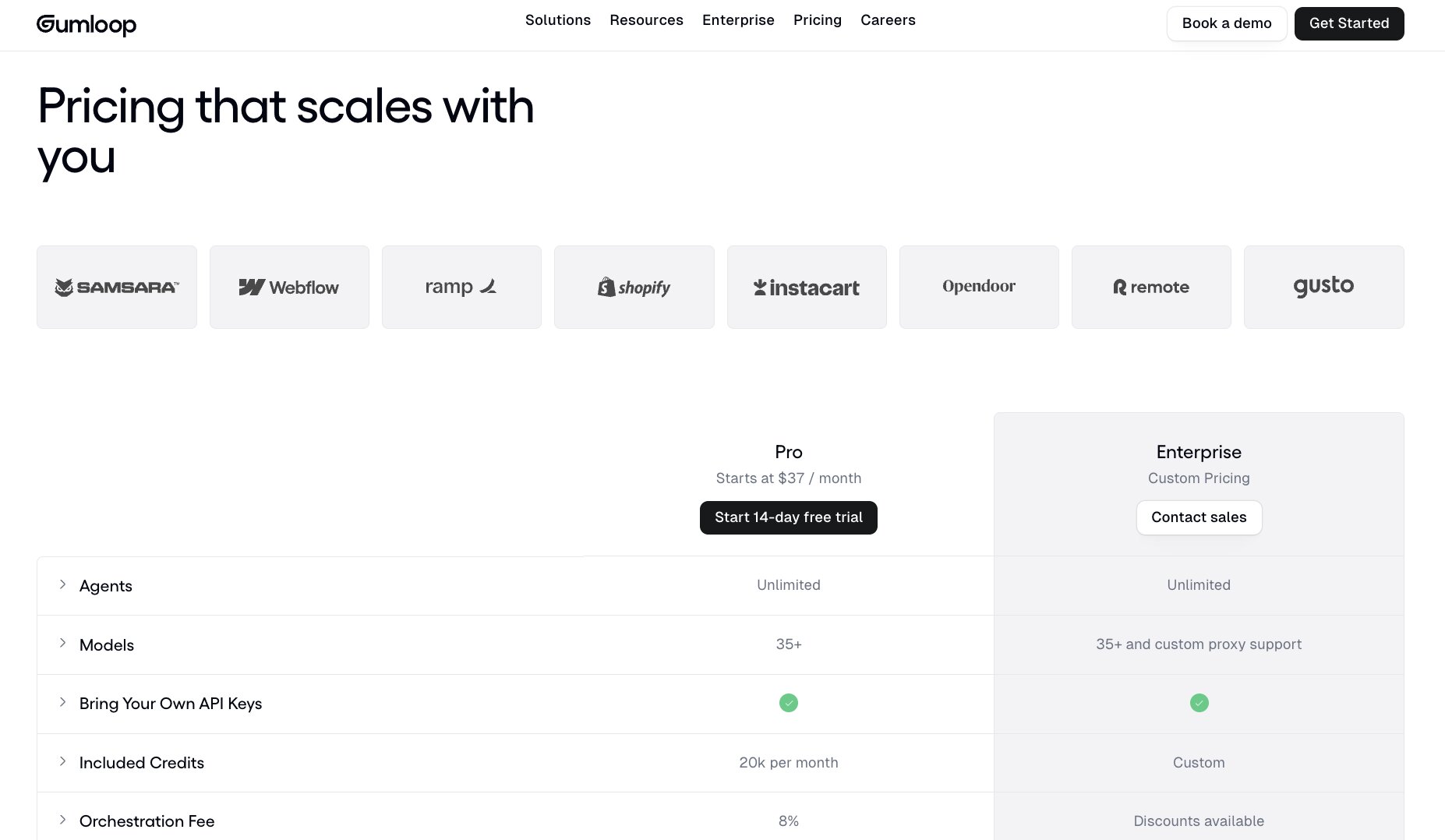
Gumloop has two pricing tiers to choose from.
- Pro: Starts at $37/month with 20k credits per month, unlimited agents, unlimited seats and teams, 35+ AI models, bring your own API keys, email support, and a 14-day free trial
- Enterprise: Custom pricing with custom credits, everything in Pro, plus role-based access control, SCIM/SAML support, admin dashboard, audit logs, custom data retention rules, and regular security reports
You can view more about the pricing options here.
Gumloop reviews
Here are what real customers of Gumloop say about it:
"Gumloop has been critical in helping all teams at Instacart - including those without technical skills - adopt AI and automate their workflows, which has greatly improved our operational efficiency." — Fidji Simo, CEO @ Instacart
"With Gumloop, any team member can now identify a manual process and turn it into an automated workflow without writing a single line of code." — David Phelps, VP, Academics @ Albert
You can also check out what others say on Gumloop's wall of love.
2. StackAI

- Best for: Enterprise companies in regulated industries (construction, logistics, wealth management)
- Pricing: Free plan available, then custom enterprise pricing
- What I like: Beautiful UI/UX, enterprise-grade security, and modern interface compared to legacy tools
StackAI is an AI agent builder that has a built-in drag-and-drop no-code interface. It's designed for enterprise companies and industries like construction, logistics, and wealth management.
Naturally, these industries have a lot of sensitive information, so StackAI has focused on security and data encryption to allow these industries to leverage AI agents.
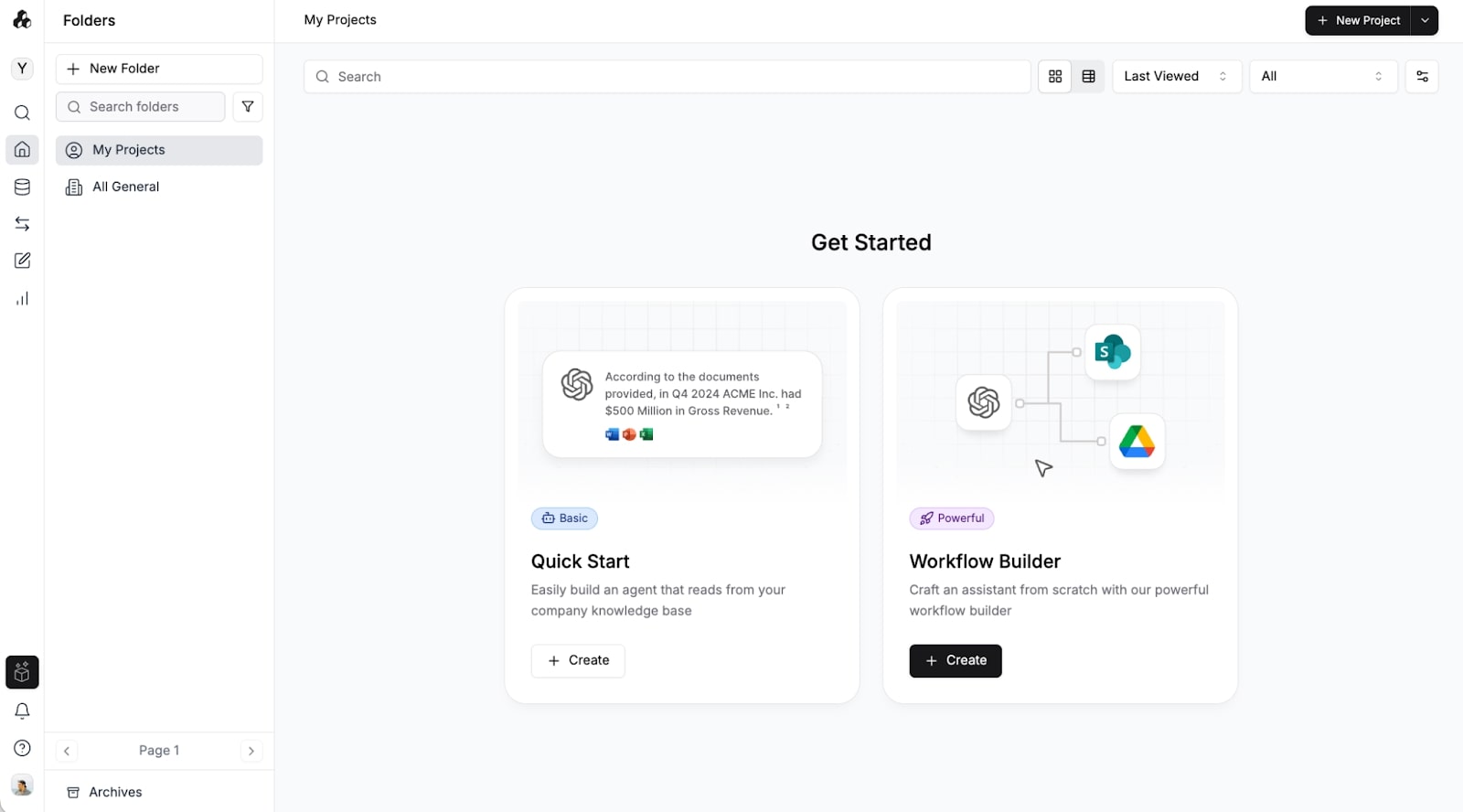
What makes StackAI different than some other tools on this list is that it's built specifically for these regulated industries, so the platform is quite advanced. They do have a free plan to play around with, but all the plans require you to book a call with their sales team and are custom to each organization.
Regardless of who StackAI is for, however, I do really like the builder interface. It's more modern than some other legacy enterprise tools in the AI space, which is quite refreshing to see.
Here are some things I like about StackAI:
- Has a beautiful UI/UX for building AI agents
- Secure and safe enough for large enterprise companies
- Has a lot of useful templates
- Includes a free plan to start playing around with
Here are some cons with StackAI:
- It's not the best platform if you're a small startup trying to build small agents
- There can be a learning curve to using the platform
- Some users report that they have a limited number of integrations
Overall, if you are a business in construction, wealth management, or logistics, this is definitely a platform to look into. But if you're a startup or a small business, it might be worth looking into an alternative.
StackAI pricing

StackAI has a free plan to get started, then custom enterprise pricing:
- Free: $0/month with 500 runs per month, 2 projects, 1 seat, and community support on Discord
- Enterprise: Custom pricing with custom number of runs and seats, all features and data loaders, dedicated infrastructure, dedicated solution engineers, on-prem deployment, Virtual Private Cloud deployment, access control, SSO (Single Sign-On), and SOC 2, HIPAA & GDPR compliance
You can view more about the pricing options here.
StackAI reviews
Here's what customers rate StackAI on third-party review sites:
- G2: 4.5/5 star rating (from +38 reviews)
- Slashdot: 4.5/5 star rating (from +13 reviews)
3. ChatGPT Work
- Best for: Multi-step research and deliverables for people who already live in ChatGPT
- Pricing: Limited access on the Free plan, then expanded access with ChatGPT Plus ($20/month) and Pro (from $100/month)
- What I like: Built into ChatGPT, can run tasks on a schedule or when something happens, and asks for approval before important actions
ChatGPT Work is OpenAI's agent for longer, multi-step tasks. It replaced the old ChatGPT agent mode, which OpenAI has since discontinued. You give it a goal and it can research information, analyze data on your behalf, and turn the results into finished deliverables like documents, spreadsheets, and presentations.
You can run a task once, put it on a schedule, or have it kick off when something happens, like a new email coming in. And for teams on ChatGPT Business or Enterprise, OpenAI also has workspace agents that you can share with teammates and use inside ChatGPT or Slack.
While this does seem promising, I have found some limitations in using it as a pure AI agent builder for your business or startup.
Don't get me wrong, the interface is clean and it's a huge addition to ChatGPT. But if you remember in the beginning of this article, I mentioned how the best AI agent platforms allow you to change the AI models you use.
With ChatGPT Work, you are limited to OpenAI's models. You can't swap between Claude, Gemini, DeepSeek, Llama, or other AI models that might be better at doing different tasks.
Here are some things I like about ChatGPT Work:
- Simple to use and built into your existing ChatGPT workflows
- Can run tasks on a schedule or when something happens, like a new email
- Great at researching information on the web and creating reports
Here are some things that are limited with ChatGPT Work:
- Limited to OpenAI's models only
- Limited in integrations with your existing tech stack (creates a walled garden within ChatGPT)
- Better suited for individual tasks than complex business workflows, unless you're on a Business or Enterprise plan with workspace agents
Overall, if you're already using ChatGPT and have a paid plan, ChatGPT Work is a cool agent to test out. However, if you're looking to build complex workflows and leverage multiple LLM models, it might be better to use Gumloop or n8n. And speaking of n8n…
ChatGPT Work pricing
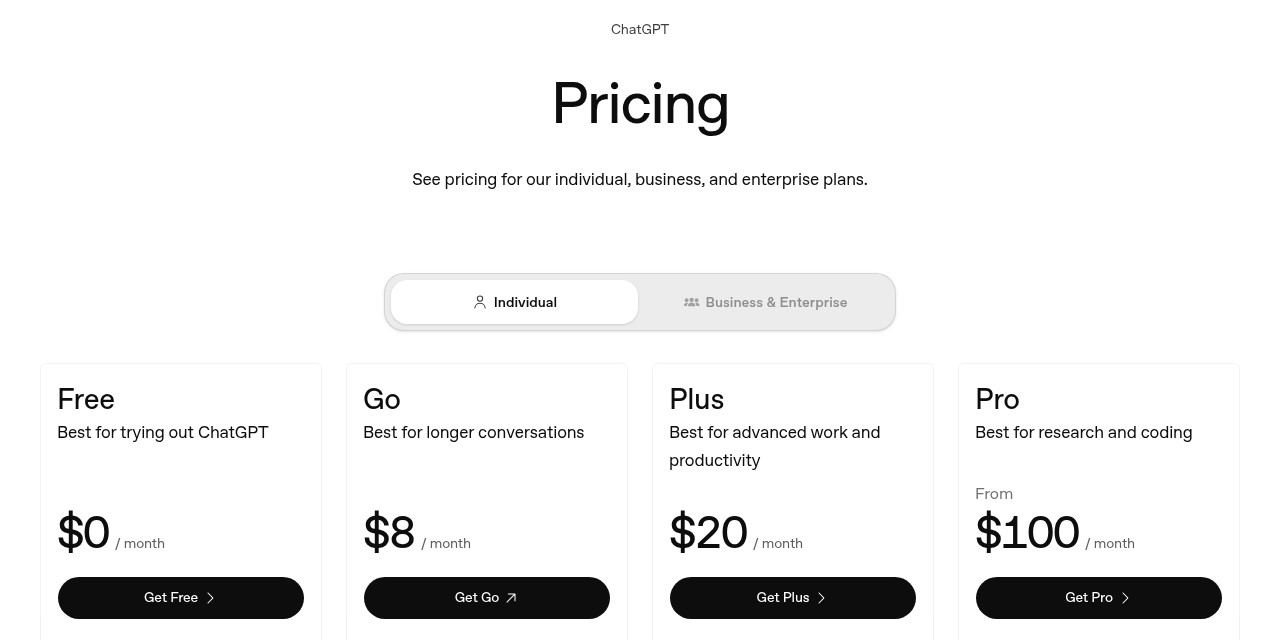
ChatGPT Work is included across ChatGPT's individual plans, with more usage on the higher tiers.
- Free: $0/month with limited ChatGPT Work access on desktop
- Go: $8/month with more messages, uploads, and image creation, plus longer memory (this plan may include ads)
- Plus: $20/month with expanded ChatGPT Work access on desktop, web, and mobile, plus projects, scheduled tasks, and custom GPTs
- Pro: From $100/month with a choice of 3 usage tiers and longer Codex and ChatGPT Work sessions
You can view more about the pricing options here.
ChatGPT reviews
Here's what customers rate ChatGPT on third-party review sites:
- G2: 4.6/5 star rating (from +2,233 reviews)
- Capterra: 4.4/5 star rating (from +349 reviews)
4. n8n
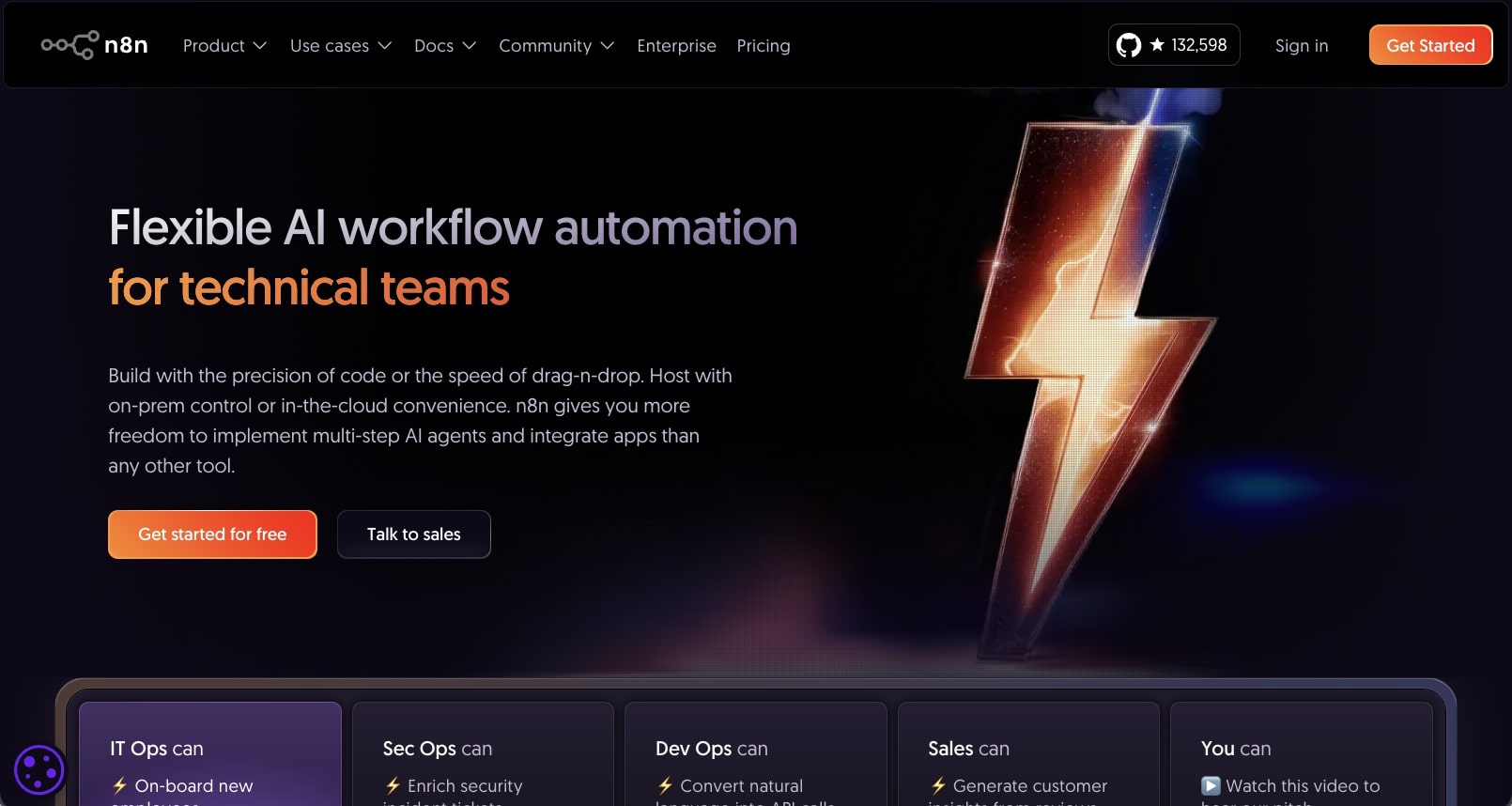
- Best for: Technical teams who want flexibility and self-hosting options
- Pricing: Free trial available, then starts at $20/month billed annually
- What I like: Large library of templates, flexible for building complex agents, fair pricing, and used by big companies like Wayfair and Vodafone
n8n is a low-code workflow automation platform. It allows you to build automations and AI agents in a visual interface similar to Gumloop. It's designed for anywhere from marketing teams to sales and customer service, and is a fan favorite for a lot of AI automation agencies.
The great thing about n8n is that it's quite popular, so there are a lot of resources online on how to use the platform. There's even a large library of templates created by the community.
What makes n8n a popular choice is that you can also self-host it. So if you're more technical and are worried about security, you don't have to host your AI agents through n8n. However, you can if you want, and the platform is SOC2 compliant.
Here are some things I like about n8n:
- Has a large library of templates and workflows to pick from
- It's quite flexible if you're tech savvy, and you can build almost any agent with it
- Pricing is fair for those on a budget
- Used by big teams at companies like Wayfair, Vodafone, and Paddle
Here are some things that can improve with the platform:
- The user interface can feel a bit clunky and outdated (not the most inviting UI for beginners)
- The Business plan is self-hosted only, so you'll need your own infrastructure for that tier
Overall, it's a solid choice if you're just getting into building AI agents and you are a technical person. However, if you're looking for a tool that is a bit more user-friendly and can still do everything n8n can, it might be worth looking into an alternative.
n8n pricing

n8n has several pricing tiers to choose from:
- Starter: $20/month billed annually (a bit more if you pay month to month) with 2.5k workflow executions (with unlimited steps), 1 shared project, 5 concurrent executions, agents, MCP and AI nodes, 1,600 Assistant credits per month, AI models without API keys, and forum support. Hosted by n8n.
- Pro: $50/month billed annually (a bit more if you pay month to month) with 10k workflow executions (with unlimited steps), 3 shared projects, up to 50 concurrent executions, 7 days of insights, up to 9,600 Assistant credits per month, admin roles, metric-based evaluations, and workflow history. Hosted by n8n.
- Business: $800/month billed annually with 40k workflow executions (with unlimited steps), 6 shared projects, SSO and LDAP, 30 days of insights, multiple environments, queue mode for scaling, and version control using Git. Self-hosted.
- Enterprise: Custom pricing with a custom number of workflow executions, unlimited shared projects, 200+ concurrent executions, 365 days of insights, external secret store integration, log streaming, extended data retention, and dedicated support with an SLA. Hosted by n8n or self-hosted.
You can view more about the pricing options here.
n8n reviews
Here's what customers rate n8n on third-party review sites:
- G2: 4.7/5 star rating (from +272 reviews)
- Capterra: 4.6/5 star rating (from +43 reviews)
5. Lindy AI
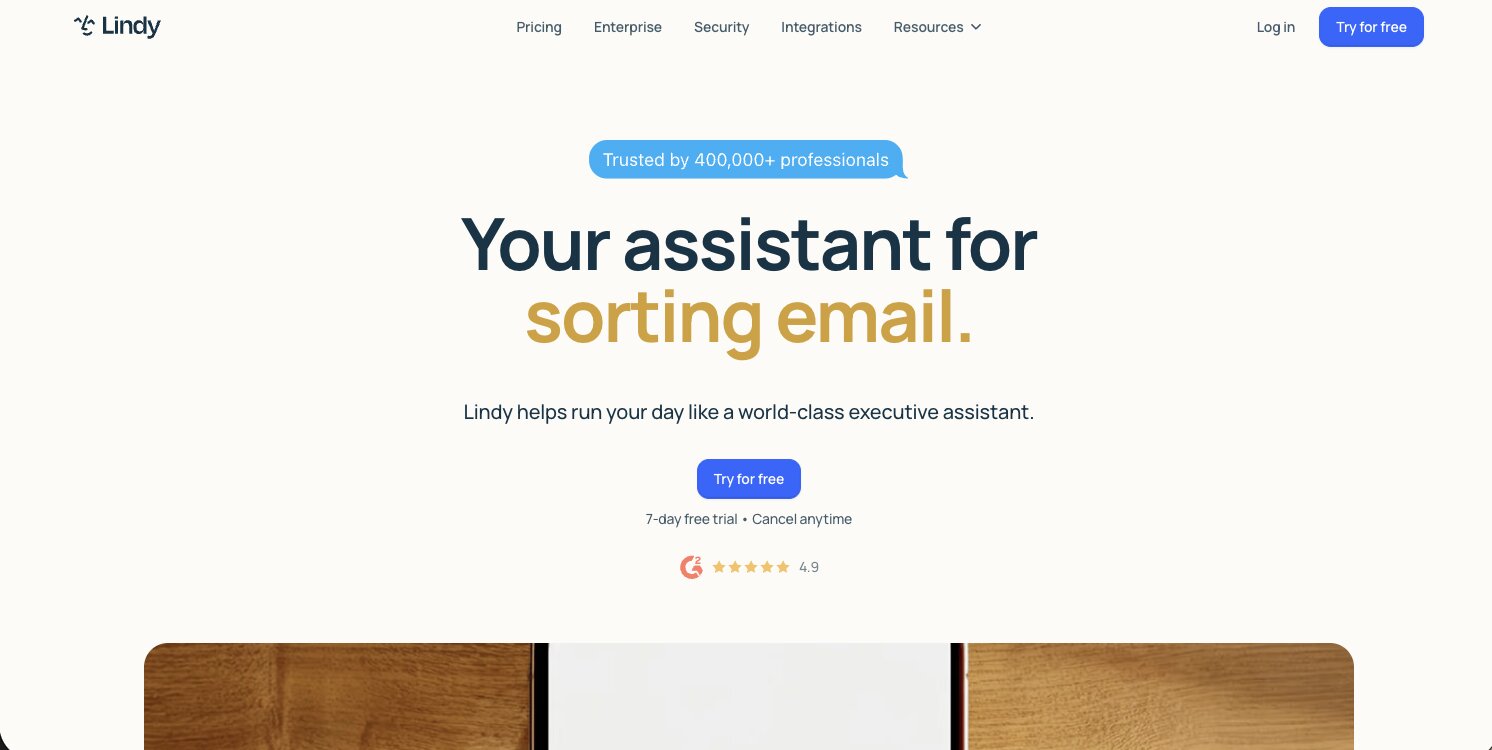
- Best for: Customer support and sales teams looking for specialized AI employees
- Pricing: Free trial with $50 in credits, then starts at $29.99/month per user
- What I like: Clear focus on support and sales use cases, simple UI, and wide range of integrations
Lindy AI is a workflow and automation builder that works like an AI teammate, and it's heavily designed for customer support and sales teams. Its agents can integrate with your existing tech stack to complete tasks on your behalf.
Similar to n8n and Gumloop, Lindy AI has a full library of integrations like Slack, Notion, Gmail, Salesforce, Linear, and tons of others. This way you can create agents that can already interact with the tools you're using.
The platform works more like an orchestration tool for building agentic workflows in different areas of customer support or sales processes. For example, it can handle qualifying inbound leads, writing personalized outreach emails, and act as your sales coach for calls.
Here are some things I like about Lindy AI:
- It's Slack-native, so you can work with it right inside threads and mentions
- The user interface is simple and easy to understand
- Has a wide range of integrations to create end-to-end automations
Here are some things that can improve with the platform:
- Every active user in your workspace is billed, so costs can add up as you roll it out to a bigger team
- Bigger jobs like research reports or dashboards can burn through credits fast
Overall, if your primary focus is customer support at a startup or small business, Lindy AI is a promising platform to look into. However, if you need something with a bit more flexibility in its use cases, it might be worth looking into an alternative to build agents with.
Lindy AI pricing
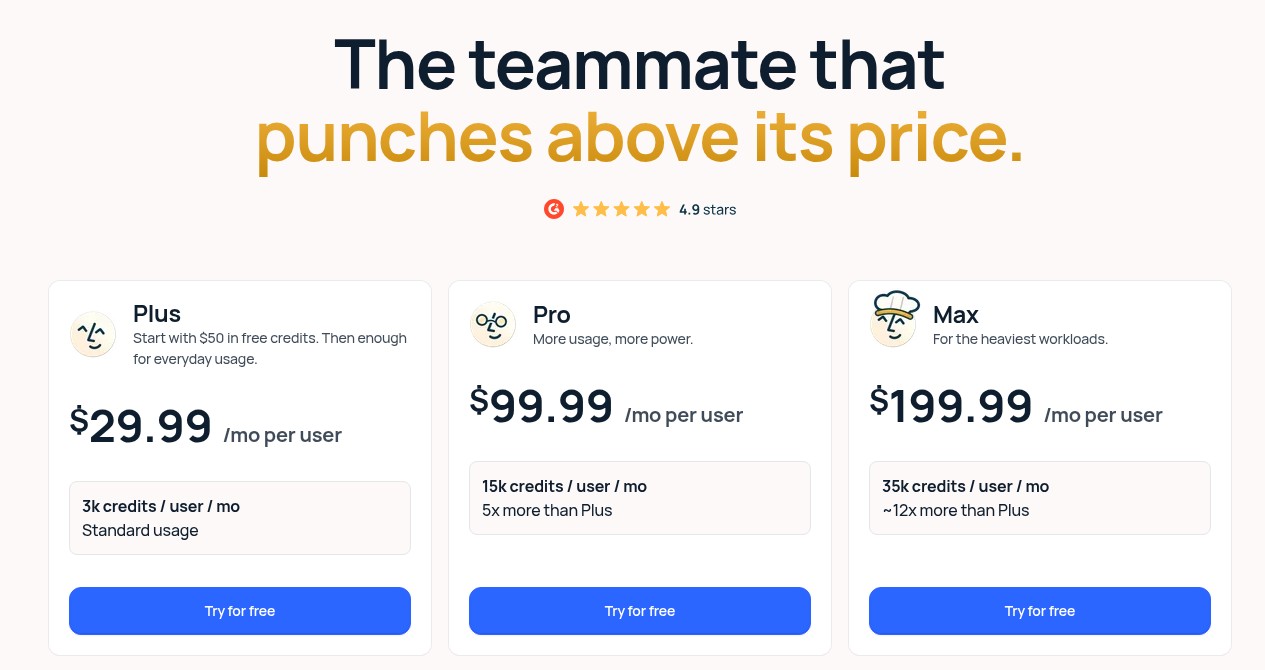
Lindy AI has four pricing tiers to choose from. Every plan starts with $50 in free credits and no credit card required.
- Plus: $29.99/month per user with 3,000 credits per user per month for everyday usage
- Pro: $99.99/month per user with 15,000 credits per user per month, plus computer use
- Max: $199.99/month per user with 35,000 credits per user per month, plus computer use
- Enterprise: Custom pricing with everything in Max, plus HIPAA compliance with a signed BAA, shared usage and bonus credits, audit logs, onboarding, and dedicated support
You can view more about the pricing options here.
Lindy AI reviews
Here's what customers rate Lindy AI on third-party review sites:
- G2: 4.9/5 star rating (from +171 reviews)
- Capterra: 3.5/5 star rating (from +2 reviews)
6. Cofounder

- Best for: Solo operators and early adopters exploring new AI agent platforms
- Pricing: 7-day free trial, then starts at $120/month
- What I like: Smooth and elegant onboarding experience, and it manages services like GitHub, Supabase, and Vercel for you
Cofounder is a newer AI agent builder created by the team at The General Intelligence Company of New York. It's still a fairly new platform, but I decided to include it in this list because it seems quite promising.
These days, Cofounder positions itself as a way to run an entire company with agents. It can help with things like SEO analysis, ICP analysis, outbound email, and social posts, and it manages your GitHub, Supabase, and Vercel accounts for you while you build.
Here are some things I like about Cofounder:
- The onboarding experience feels very smooth and elegant
- It manages the services behind your project (like GitHub, Supabase, and Vercel), and you can claim ownership of them whenever you want
Here are some things that can improve with Cofounder:
- It's not the most flexible AI agent builder for general business workflows, since it's built around starting and running a company
- It's designed more for solo operators over large enterprise teams
Overall, if you consider yourself an early adopter of AI tools, this is definitely a platform to check out.
Cofounder pricing
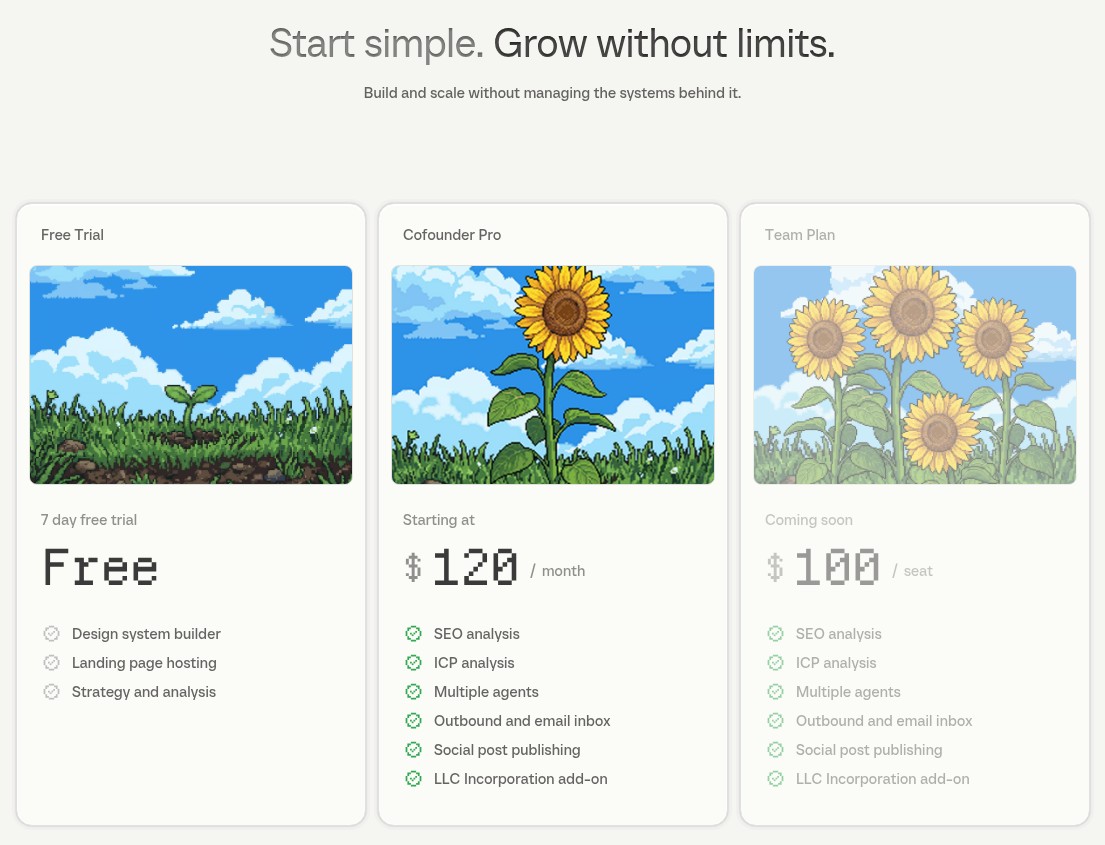
Cofounder has a free trial and then a monthly plan.
- Free Trial: $0 for 7 days with the design system builder, landing page hosting, and strategy and analysis tools
- Cofounder Pro: Starting at $120/month with SEO analysis, ICP analysis, multiple agents, outbound and an email inbox, social post publishing, and an LLC incorporation add-on
- Team Plan (coming soon): $100/seat with everything in Pro, plus multiplayer, SOC 2, and priority support
You can view more about the pricing options here.
There are no reviews yet on third-party websites for Cofounder.
7. Zapier
- Best for: Non-technical teams who want a familiar platform with extensive documentation
- Pricing: Free plan available, then Agents start at $33.33/month billed annually
- What I like: Stable and popular platform with lots of tutorials, easy-to-use dashboards, and true no-code platform for creating automations and agents
Zapier is a workflow automation tool that has been around for a very long time. It's the OG of automation tools, and there's a good chance you already know about it. However, with the rise of AI, Zapier has now started to pivot itself into an AI agent builder.
In the past, Zapier used to just let you create "if this then that" automations, but now their builder allows you to automate complex decision-making and create agents that can act on your data and make decisions across multiple apps in your workflow.
It has the same Zapier interface that has multiple connectors to different tools. And similar to Gumloop and some other tools on this list, you can simply describe the type of agent you are trying to create and the platform will start creating it for you.
Here are some things I like about Zapier:
- It's a stable and popular platform, so there are lots of tutorials on how to use it
- The dashboards are fairly easy to figure out and use
- It's a true no-code platform for people who want to create automations and agents
Here are some things that can improve with the platform:
- Sometimes there can be these weird bugs where it says a workflow has failed when it actually hasn't (I've experienced this multiple times)
- Agents are priced separately from the main Zapier plans, so you may end up paying for two plans
Overall, Zapier is a solid choice for anybody who wants a reliable automation tool. It may not fully be there in terms of being an AI agent builder, but it does have a promising future.
Zapier pricing
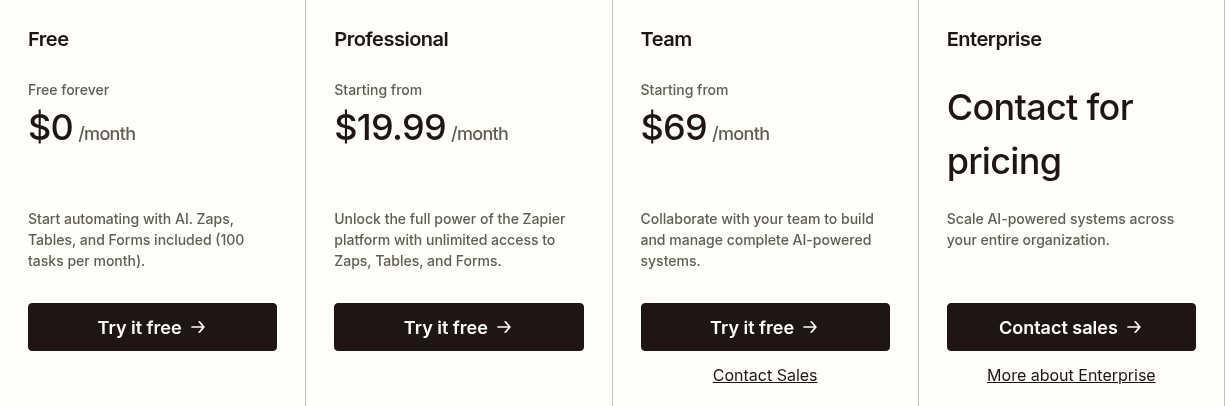
Zapier prices its core automation plans and its Agents plans separately. Here are the core plans.
- Free: $0/month, 100 tasks per month, unlimited Zaps, Tables, and Forms, two-step Zaps, and Zapier Copilot
- Professional: Starting at $19.99/month, everything in Free, plus multi-step Zaps, unlimited premium apps, webhooks, AI fields, conditional form logic, and email + live chat support
- Team: Starting at $69/month, everything in Professional, plus 25 users, shared Zaps and folders, shared app connections, SAML SSO, and priority support
- Enterprise: Contact for pricing, everything in Team, plus unlimited users, advanced admin permissions and app controls, advanced deployment options, annual task limits, observability, and a Technical Account Manager
And here are the Agents plans.
- Agents Free: $0 with 400 activities per month, live data sources, web browsing, and access to your agents in the Chrome extension
- Agents Pro: $33.33/month billed annually ($400/year) with 1,500 activities per month
- Agents Enterprise: Contact for pricing with a custom number of activities, agent sharing across your organization, and enterprise-grade audit logs
You can view more about the pricing options here.
Zapier reviews
Here's what customers rate Zapier on third-party review sites:
- G2: 4.5/5 star rating (from +2,046 reviews)
- Capterra: 4.7/5 star rating (from +3,048 reviews)
The difference between an AI agent and AI workflow
Before you go off and start building AI agents, I think it's important to understand the difference between an AI agent and an AI workflow.
A lot of people use these terms interchangeably, but they're actually quite different.
Workflows are pre-planned steps that follow a set path. You give them an input, they execute a series of actions, and you get a consistent output every time. They're predictable and reliable.
Agents are more flexible. They can make decisions on the fly based on the context they're given. They use tools (like workflows) to accomplish tasks, but they decide which tools to use and when to use them.
With agents, you need to be a bit more methodical in how you build them because they are only as useful as the tools they have access to. Without well-built workflows, an agent can't really do much.
So if you're just getting started, focus on building reliable workflows first. Once you have those in place, you can layer in agents to orchestrate them. This way, you're not trying to build everything at once, and you'll have a much better understanding of what you actually need the agent to do.
Most of the platforms on this list let you build both workflows and agents, so you're covered either way.

Read related articles
Check out more articles on the Gumloop blog.